To use AI in software development, let it draft the work at each stage and put a check or a person on every draft. The drafts include requirements, design notes, code, review comments and tests. The check can be a test suite, an automated build, or an engineer who approves the change.
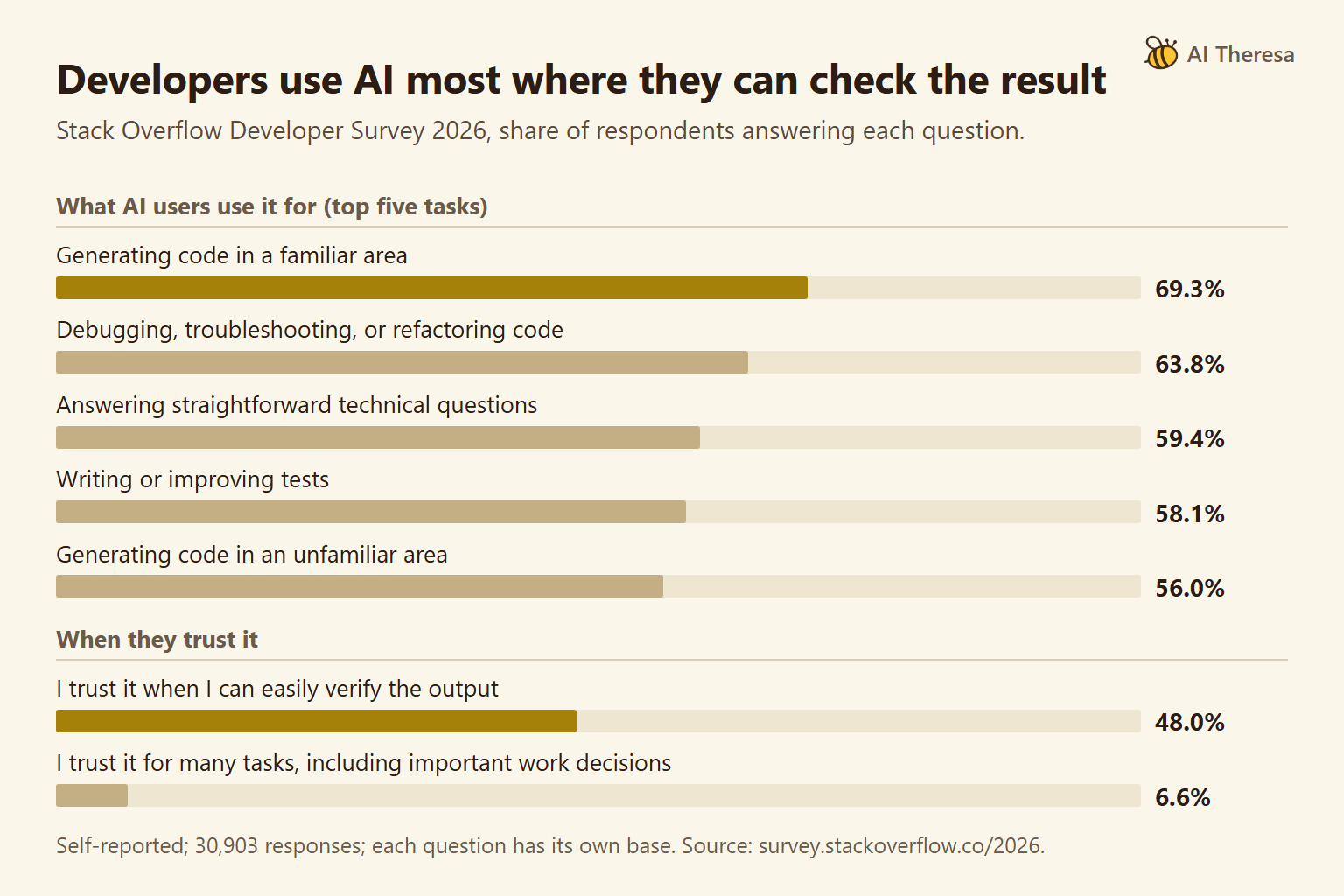
Stack Overflow published its 2026 Developer Survey results in October. Its own reading of the AI results is that developers see AI as "very good at technical problems with checkable answers," and less good at the other everyday problems of work.
The approach pays off where output can be checked cheaply, such as code with good tests. It helps less where nothing checks the draft, such as a requirement nobody wrote down or a design trade-off. There, AI can still draft options, but a person has to make the call.
What Is AI in Software Development?
AI in software development is the use of AI models to draft, explain and check the work a team produces while building software. Most of these models are large language models (LLMs), which are trained on large amounts of text and code and generate text in response to a request. The work they touch includes specs, design records, code, review comments and tests. Building AI features into a product is a different subject, although some guides mix the two up.
Daily use is now routine for many developers. In the 2026 Stack Overflow survey, 80% of respondents said they used AI at least an hour per day. The survey had 30,903 responses and is self-reported, so it describes the people who chose to answer.
Some companies now report how much of their code AI writes. At Cloud Next 2026, Google's CEO wrote that 75% of all new code at Google is "AI-generated and approved by engineers." The figure is company-reported and covers new code, not the whole codebase.
The tools come in two main forms. An assistant answers inside a chat window or an editor and leaves the next step to the developer. A coding agent reads the project, edits files and runs commands such as tests on its own, then reports back. Agents can finish more in one pass, and they can also make larger mistakes before anyone looks, so their checks must be in place before they start.
Get Started with Theresa for FREEHow Does AI Transform the Software Development Lifecycle?
The software development lifecycle (SDLC) is the sequence of stages a change passes through: requirements, design, code, review, testing and release. AI lowers the cost of a first draft at every stage. A spec, a design note or a test file that took an afternoon can now take minutes. The slow part becomes checking those drafts.
In a 2025 randomized trial, METR found that experienced open-source developers took 19% longer on real issues when they used AI tools. The same developers believed AI had made them faster.
METR has since marked those results as out of date. Its 2026 update says developers are likely more sped up now than in early 2025. It also calls the new data "an unreliable signal," because some developers declined to do tasks without AI. For a team, the lesson is to measure your own cycle time rather than trust anyone's impression, including your own.
In the 2025 Stack Overflow survey, the top frustration was "AI solutions that are almost right, but not quite." Almost-right output passes a quick read and fails later. The 2026 results describe human-in-the-loop as "the dominant mode of working with these tools," meaning a person reviews and accepts what the AI produces.
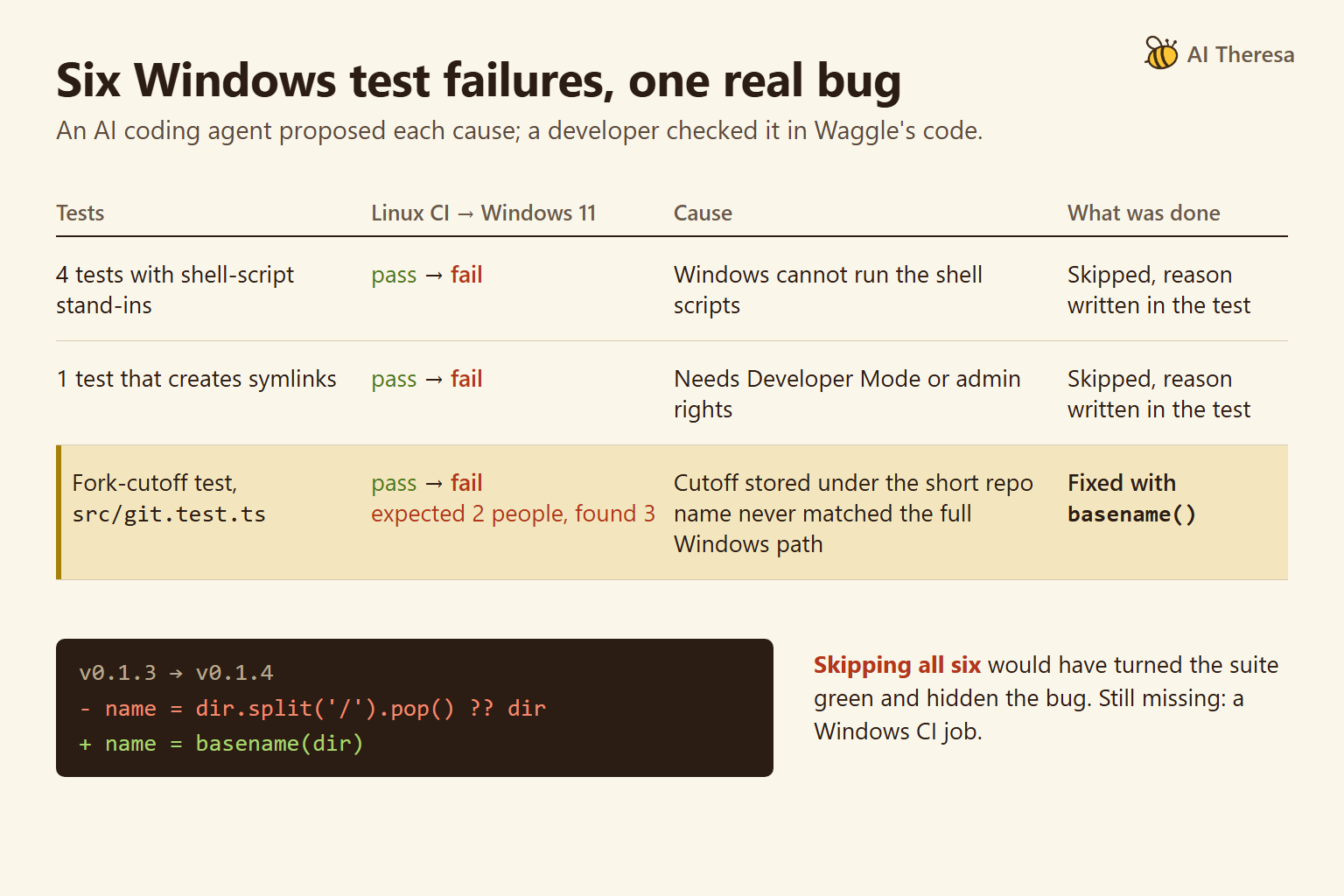
Through this guide we follow one real bug in how Waggle, our open-source code auditor, read file paths. Its tests passed in continuous integration (CI), the automated test run on every change, which used Linux machines. On Windows 11, six tests failed. Later sections show which stages could have caught it and which check actually did.
Get Started with Theresa for FREEHow to Use AI in Software Development
The five steps below apply at any stage. They come from what goes wrong most often: the AI lacks information, nothing checks its work, or a rule lives only in a prompt.
1. Start where the output has a cheap check
Pick work where a test, a type checker or a build tells you quickly whether the draft is right. Generating unit tests, refactoring code that tests already cover, and fixing a failing build are good first uses. Drafting a pricing rule nobody can test is a poor one.
2. Tell the AI what it cannot see
A model knows only its training and its context, the text supplied with the request. Give it the spec, the coding conventions and the list of platforms the software must support. Most coding agents read a project file for this, such as CLAUDE.md for Claude Code.
3. Give it a check it can run
Anthropic's Claude Code best practices put the method in one line: "tell Claude what it can't see, give it a check to run, and enforce the rules that can't have exceptions." An agent that can run the tests can find many of its own mistakes. In the Waggle case, that check was npm test, and it ran only on Linux.
4. Enforce hard rules outside the prompt
Instructions in a prompt are followed most of the time, which is not the same as always. Rules that must hold belong in deterministic checks, which give the same result every run. Examples are hooks that run on every edit, CI jobs, and a person who approves the merge. A platform missing from CI is a gap that no prompt can close.
5. Decide who signs off at each stage
Name the person who accepts AI output for requirements, design, code and release. A product owner signs off on AI-drafted acceptance criteria, and a senior engineer approves any change to the CI pipeline itself.
Tools to try at each stage
The table lists tools to try at each stage, current as of November 2026, and what should check their output. It is unranked.
| Stage | Tools to try (as of Nov 2026) | What checks the output |
|---|---|---|
| Requirements | GitHub Spec Kit, Kiro specs | A product owner accepts the acceptance criteria |
| Design | Kiro design.md, decision records drafted in any assistant | A senior engineer accepts the decision |
| Code | Claude Code, GitHub Copilot cloud agent, Devin Desktop | Tests, type checks and CI on every supported platform |
| Review | GitHub Copilot code review, AI Theresa Waggle | A reviewer confirms each finding against the code |
| Testing | Claude Code or Copilot cloud agent asked to write tests and explain failures | A filter like Meta's TestGen-LLM: tests that build, pass reliably and add coverage |
| Docs and CI/DevOps | Coding agents drafting READMEs and CI config | A docs build that runs the examples; a person approving pipeline changes |
Tool names change fast. GitHub now calls its coding agent Copilot cloud agent, Windsurf became Devin Desktop in June 2026, and Amazon is retiring Q Developer in favor of Kiro. Check names and plans on the vendor's own docs before you standardize on one.
Get Started with Theresa for FREEUsing AI for Requirements Analysis and Planning
Requirements analysis turns a business need into statements a team can build and test against. AI helps most when it drafts those statements in a structured form that a person can accept or reject. Spec-driven tools are built around that idea.
GitHub's Spec Kit treats the spec as "a contract for how your code should behave" that "becomes the source of truth" for the coding agent. It works with GitHub Copilot, Claude Code and Gemini CLI. Amazon's Kiro generates a requirements.md file for each feature, with user stories and acceptance criteria, before any design or code.
A 2025 review of 74 studies on LLMs in requirements engineering found that most focused on elicitation and validation. The studies were "usually evaluated in controlled environments, with limited use in industry settings." Treat AI-drafted requirements as a first pass that a product owner edits.
Nobody had written down that Waggle must run on Windows, so no test or CI job demanded it. As an illustrative example, an AI asked to list the platforms a CLI should support, with acceptance criteria for each, could propose "runs on Windows 11". A person still decides whether the team supports that platform and pays for the extra CI time.
Planning also includes choosing what to build at all. Our free desktop app, Observation, ranks the workflows costing your team the most, which helps a team pick the first candidate for automation. It does not write requirements or user stories; those come after the choice. Our agentic workflow automation guide covers how to automate a workflow once it is chosen.
Get Started with Theresa for FREEUsing AI for Software Architecture and Design
Architecture decisions are the hardest place to check AI output, because most of them have no test. A choice between a queue and a direct call, or between two databases, plays out over months. AI can lay out options and trade-offs quickly. A person who will live with the result should choose.
The most useful artifact here is a short decision record. Michael Nygard defined architecture decision records (ADRs) as records of decisions that "affect the structure, non-functional characteristics, dependencies, interfaces, or construction techniques" of a system. An assistant can draft an ADR from a design discussion. Later, a coding agent can read the ADRs as context and follow them.
Kiro's specs add a design.md file with the architecture, sequence diagrams and implementation notes. The same rule applies to it as to an ADR. The AI drafts, and an engineer who owns the system accepts or rewrites it.
Documentation follows the same rule. An AI can draft a README or an API reference from the code and the ADRs in minutes. A docs build that runs the README's code examples is the check, and a person reads the rest against the code.
In the Waggle case, the decision worth recording is which operating systems the tool supports, a non-functional choice that affects every part of the code that reads file paths. A one-paragraph ADR could say "Supported: Linux, macOS and Windows; CI runs the suite on all three." A lint rule that flags splitting paths on / would then enforce the detail. This is an illustrative example of what the case suggests, not a record the team had at the time.
Some design work needs people who will own the system. That is the work Theresa's forward-deployed engineering team does: it takes a business problem from diagnosis to a running AI system in the customer's own cloud.
In one case study, the team traced untrustworthy dashboards to upstream schema drift, meaning unannounced changes in the structure of source data. They then rebuilt the dashboards on a storage layer that holds. This is a service with people on it, not a tool you run yourself. Our guide to AI forward-deployed engineers explains how that model works.
Get Started with Theresa for FREEHow to Use AI for Code Generation
Code generation is where AI use is most mature and easiest to check. An agent can write a function, run the tests and fix what fails in one loop.
Developers in the 2026 Stack Overflow survey use AI to generate code more often in familiar areas than in unfamiliar ones. In familiar code, a developer can spot a wrong answer quickly. In unfamiliar code, the same answer looks plausible for longer.
In a Stanford user study published in 2023, 47 participants wrote security-related code with or without an AI assistant. Those with the assistant wrote less secure code and were more likely to believe it was secure. The study used older models, but the gap between confidence and correctness is still the thing to design against.
The Waggle bug came from one ordinary line in src/org.ts, which took the last part of a path with dir.split('/').pop(). On Linux and macOS that works. On Windows, paths use backslashes, so the "last part" was the whole path.
The fix was const name = basename(dir);, which uses Node's own path functions. A person or a model could write the original line in seconds, and it reads correctly in review. What decided whether it shipped was the check that ran on it, and that check ran on one platform.
For AI-generated code, keep each change small enough to review in one sitting. Ask for tests in the same change as the code. Run those tests on every platform you claim to support, including the ones you do not use day to day.
Get Started with Theresa for FREEAI-Powered Code Review and Optimization
Code review is the stage where a second reader looks at a change before it merges. AI now acts as that second reader in two places: inside pull requests and across a whole repository.
Pull request review assistants
GitHub's Copilot code review "reviews your pull requests, identifies issues, and suggests fixes you can apply in a couple of clicks." It is available on paid Copilot plans. The hard part with any review assistant is noise, meaning comments that are wrong or not worth acting on.
When Google built a model to resolve reviewer comments, it calibrated the model so that about half of its suggested edits would be correct. The team chose that target because incorrect edits "take the developers time and reduce the developers' trust." Decide how many false alarms your team will accept, and tune or replace the tool when ignored comments pile up.
For optimization, give the AI the profiler output or the slow query plan along with the code, and ask it to name the measurement that would prove the change faster. Accept a speed-up only with a benchmark run before and after the change.
Repository audits
Waggle, our auditor, reads a codebase, and optionally connected data, and reports problems it can back with evidence. It is open source and runs locally on your own Anthropic key or Claude login. A claim it cannot support becomes an "open question," and a check that finds nothing is reported as "ruled out."
A model also audits each claim before it reaches the report, which is a filter, not a test. A Quick Ask typically costs $0.30 to $1 and a Full Scan $5 to $30, with a cap a run can exceed. Run a full scan where PR review does not reach, such as an inherited codebase or a check before a release.
A Waggle scan did not find its own Windows path bug; a developer running the tests on Windows did. Review tools, including ours, read code, and a line like this is easy to read past. Running the tests on that platform showed it at once. The Waggle page and the Waggle repository describe what it does check.
Get Started with Theresa for FREEUsing AI for Software Testing and Quality Assurance
Testing is the check that most other stages rely on, so AI-written tests need their own filter. A test that always passes adds nothing and hides problems behind a green result.
Generating tests
Meta's TestGen-LLM shows one way to filter. It discards any generated test that does not build, does not pass reliably, or does not add coverage. Meta reports that its engineers accepted 73% of the tool's recommendations for production. That is a company-reported number for Meta's own code, so copy the filters before you copy the tool.
Triaging failures with an agent
In the Waggle case, a developer ran npm test on Windows 11, and six tests failed that passed on Linux CI. An AI coding agent read each failure and proposed a cause. The developer checked each proposal against the code.
Five failures were limits of the test setup. Four tests used shell-script stand-ins that Windows cannot run. One needed symbolic links, which require Developer Mode or admin rights on Windows. Those five were skipped, with the reason written in each test.
The sixth was the real bug. The fork-cutoff test in src/git.test.ts expected 2 people across the organization and found 3. The cutoff was stored under the short repository name, which never matched the full Windows path. Skipping all six tests would have turned the run green and hidden the bug.
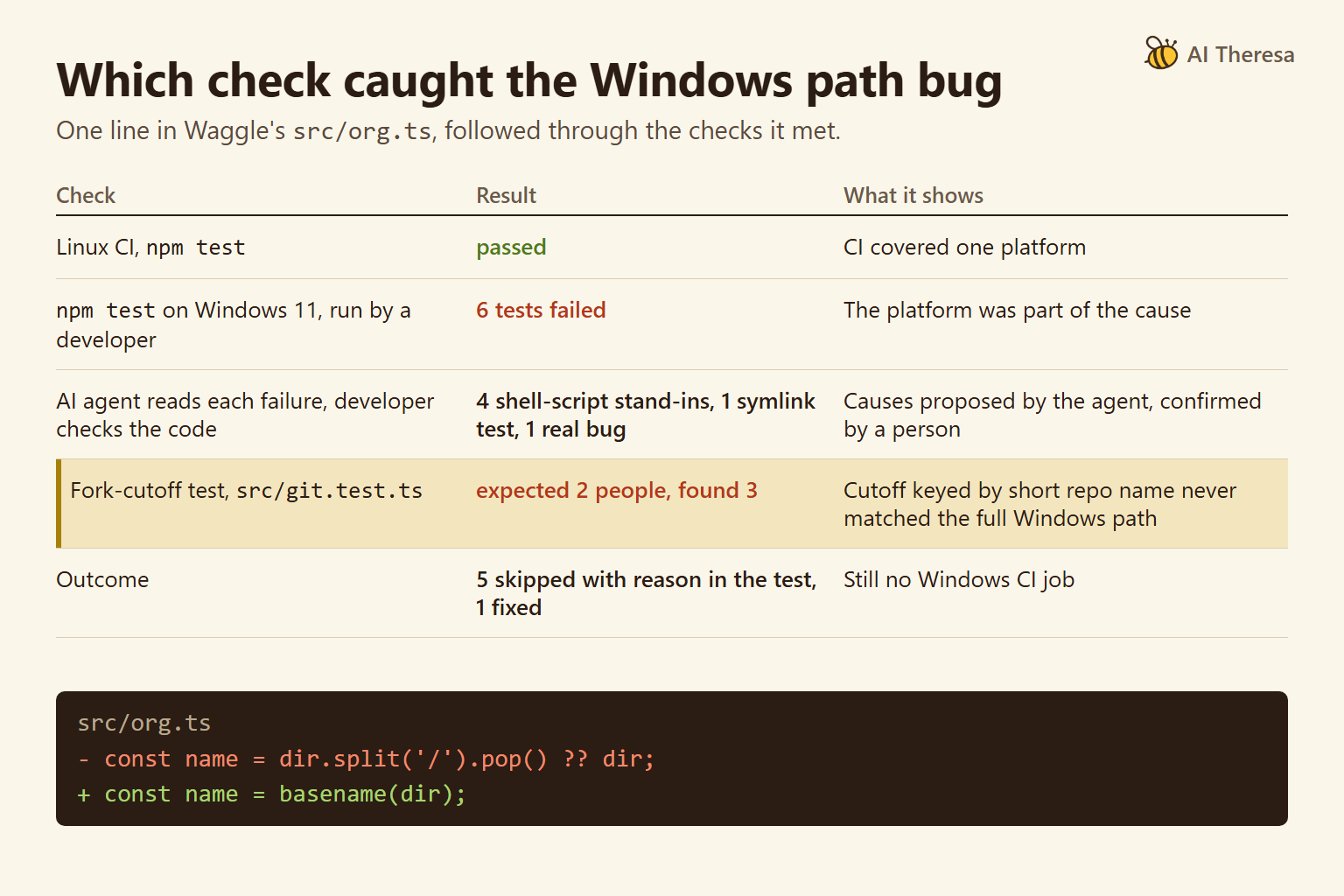
Guides like this one warn against skipping tests, and Waggle skipped five. The five skips cover environment limits, each with a written reason, and the real bug was fixed. The open gap is that Waggle still has no Windows CI job, so the next Windows-only bug depends on someone running the tests by hand. Our AI code debugging guide walks through the same case step by step.
For DevOps automation, the missing piece is a CI matrix, a configuration that runs the suite on every operating system you support. In a GitHub Actions matrix, that means adding windows-latest next to the Linux runner. An agent can draft that change in minutes, and the first run on each platform checks both the configuration and the code. A person should still approve pipeline and deploy changes, because a broken pipeline can fail silently or ship code that nothing tested.
Conclusion
AI makes first drafts cheap at every stage of the lifecycle, so the work that decides quality moves to checking them. To use AI in software development well, give each draft a deterministic check or a qualified person before it moves on.
When deciding where to add AI next, start with the stage that has a cheap, automatic check. Keep people on decisions no test can verify, such as requirements trade-offs, architecture and release. Where a stage has no check yet, add the check before you add the tool.