AI-powered automated debugging uses language models to find, explain and sometimes fix software bugs. It ranges from a chat answer about one error to an agent that opens a pull request. One well-documented example is Hugging Face's CI agent, Serge, which reproduces real test failures every night and opens verified patches for maintainers to merge. The team reports 29 merged fixes in roughly 80 days.
Automation pays off for bugs that come with a repeatable check, such as a failing test or a scanner alert. It helps little when nobody can reproduce the failure, no test covers the code, or nobody can state the correct behavior. This article follows one real bug through each level: six Windows test failures in Waggle, our open-source code auditor, that hid one path bug.
What Is AI-Powered Automated Debugging?
AI-powered automated debugging is the use of AI models to find the cause of a software failure, explain it, and propose or apply a fix. The more of that loop runs without a person, the more automated it is.
The idea is older than chat assistants. Researchers have long studied fault localization, which ranks the code lines most likely to cause a failure, and automated program repair, which generates candidate patches until failing tests pass. The AutoSD paper on LLM-driven scientific debugging describes both as techniques that "aim to help developers by automating the debugging process in part."
Language models state hypotheses in plain words and can call tools such as a debugger or a test runner. Use is already broad: in the Stack Overflow 2026 developer survey, 63.8% chose "Debugging, troubleshooting, or refactoring code" as a way they use AI.
The running example is a real bug in Waggle's open-source repository, which Level 2 below tells in full. Our guide to AI code debugging walks through the same case step by step; here it shows what changes at each level.
Get Started with Theresa for FREEHow AI Is Changing the Software Debugging Process
Debugging has two expensive parts: finding the cause and proving the fix. AI makes the first part cheaper. A model reads a stack trace, a test log and a dozen files in seconds and offers candidate causes.
That makes proof matter more. Hugging Face's engineers put it plainly: "The fixes themselves are often simple. The annoying part is the loop around them." The loop is reproducing the failure, rerunning tests and judging whether a green result means anything.
The productivity evidence is mixed, and each study has limits. METR's 2025 trial found experienced open-source developers took 19% longer on real issues when allowed AI tools. Its February 2026 update says developers are likely "more sped up" now, but calls its own data "only very weak evidence" for the size of the change.
Google's DORA 2025 report linked AI adoption with higher throughput and a "negative relationship with software delivery stability."
Get Started with Theresa for FREEThree Levels of AI-Assisted Debugging
Neon's engineers proposed three levels of debugging with AI in 2025, from pasting an error to an agent driving a debugger. Their rule of thumb still holds: "If you haven't made progress after two iterations with the model, it's time to move to a more sophisticated debugging approach." We keep three levels and define each by what the AI sees, what it may change and who checks the fix.
| Level | What the AI sees | What it may change | Who checks the fix | Tools today (examples, not a ranking) |
|---|---|---|---|---|
| 1. Prompt-based assistance | The error, stack trace or snippet you paste | Nothing; it suggests | You | ChatGPT or Claude chat, GitHub Copilot Chat /fix, JetBrains "Explain with AI" |
| 2. Context-aware analysis | The repository, test output, terminal, sometimes logs | Files in your workspace, with your approval | You, using the evidence it shows | Cursor Debug Mode, Claude Code, Sentry Seer |
| 3. Autonomous agents | Alerts, CI failures or issues, plus code, logs and history | A branch and a pull request; some deploy | Automated gates and a reviewer, or nobody if auto-publish is on | Hugging Face's Serge, GitHub agentic autofix, Replit Monitoring Agent, Devin Oncall |
Our comparison of AI debugging tools covers product choice in more depth.
Level 1: Prompt-based assistance
At Level 1 you paste an error into a chat and the model explains it. It sees only your excerpt, so its answer is only as good as that excerpt. Paste the failing assertion, the test body and the function under test, and say which platform it fails on. This works for unfamiliar error messages and small self-contained functions.
An illustrative replay: pasting the fork-cutoff failure, "expected 2, found 3," gives the model no test file and no path code. It might guess at duplicate data or give general Windows path advice, with no way to tell which of the six failures matter. Adding "passes on Linux CI, fails on Windows" would at least point it at paths.
Level 2: Context-aware analysis
At Level 2 the AI works inside your repository, reading code and running tests. Cursor's Debug Mode "generates hypotheses, adds log statements, and uses runtime information to pinpoint the exact issue before making a targeted fix," and it asks you to reproduce the bug first. Anthropic's Claude Code best practices suggest prompts such as "write a failing test that reproduces it, then fix it." Sentry's Seer starts from an issue Sentry recorded, runs a root-cause analysis step, and can hand the fix to a coding agent such as Claude Code or GitHub Copilot.
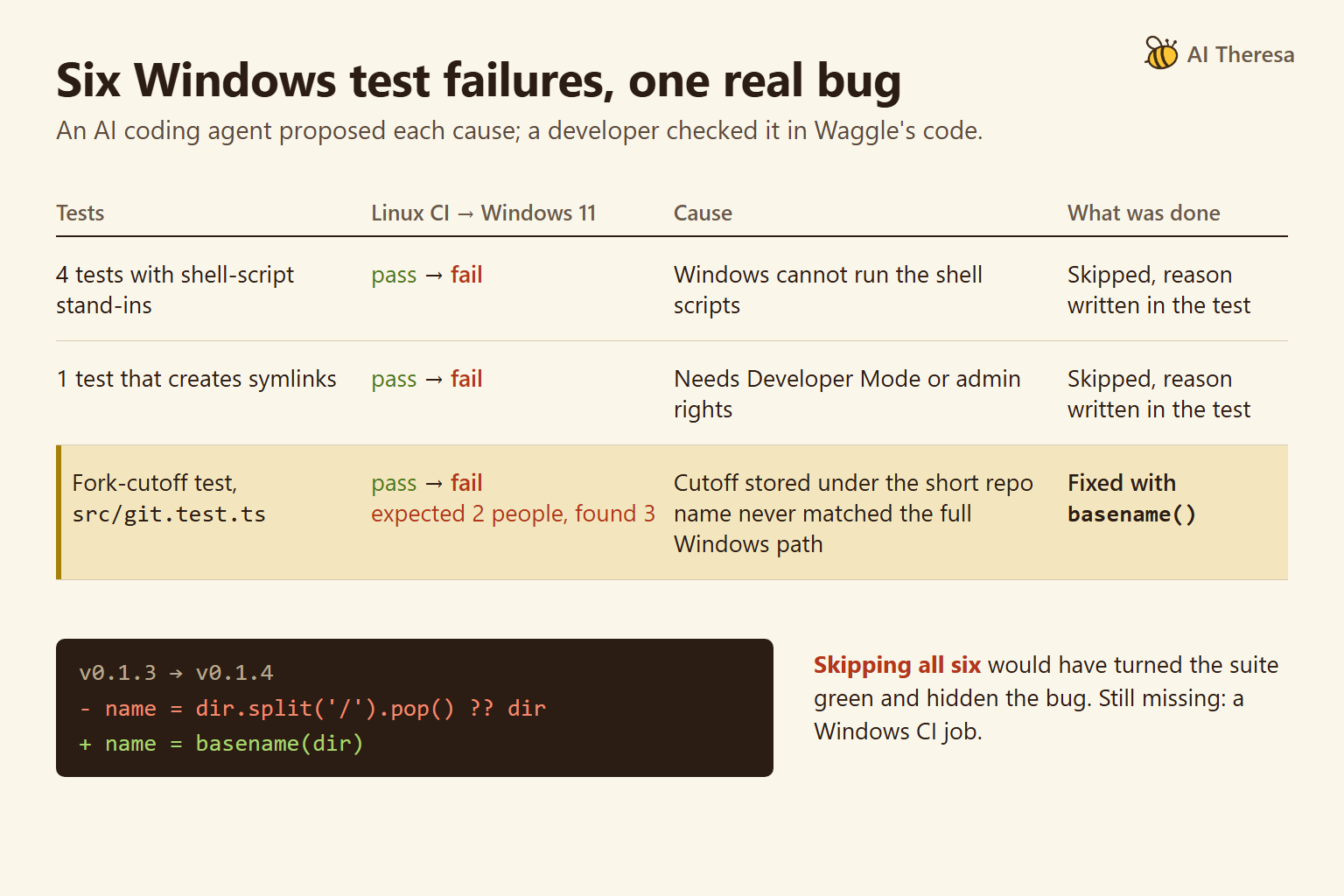
This is what happened with the Windows failures. A developer ran npm test on Windows 11, and six tests failed that passed on the project's Linux-only CI. An AI coding agent read each failing test with its code and proposed a cause, and the developer checked each one.
Five came from the test setup: four tests used shell-script stand-ins that Windows cannot run, and one created symlinks, which need Developer Mode or admin rights. The sixth, the fork-cutoff test in src/git.test.ts, expected 2 people across the org and found 3.
The cause was a path split on /. The cutoff was stored under the short repo name, which never matched the full Windows path, so the count came out one too high. Version 0.1.4 switched to basename(), and the same test, run on Windows, was the check.
Level 3: Autonomous agents
At Level 3 an agent starts from a trigger, such as a CI failure or an alert, and works with nobody at the keyboard. It usually pushes a branch and opens a pull request. GitHub's agentic autofix proposes a fix and "reruns CodeQL to confirm the fix closes the alert" before opening a draft pull request. The October 2026 GA release covers code scanning alerts for GitHub Code Security and Advanced Security customers on Enterprise Cloud.
Replit's Monitoring Agent goes further: with auto-publish on, it can deploy a validated fix to production. Devin Oncall, generally available since October 2026, investigates alerts and bug reports. Its launch post notes that agents "still stop at the first plausible root cause," so it adds a second agent to review the first. Our guide to AI production debugging covers alert-driven investigation in more depth.
An illustrative replay: an unattended agent told to make the Windows run green could skip all six tests, and the path bug would ship. Level 3 needs gates that catch this.
Get Started with Theresa for FREEHow Autonomous AI Debugging Agents Work
Most autonomous debugging agents follow the same loop. Hugging Face's account of Serge shows where each gate sits.
1. Pick a real failure and reproduce it
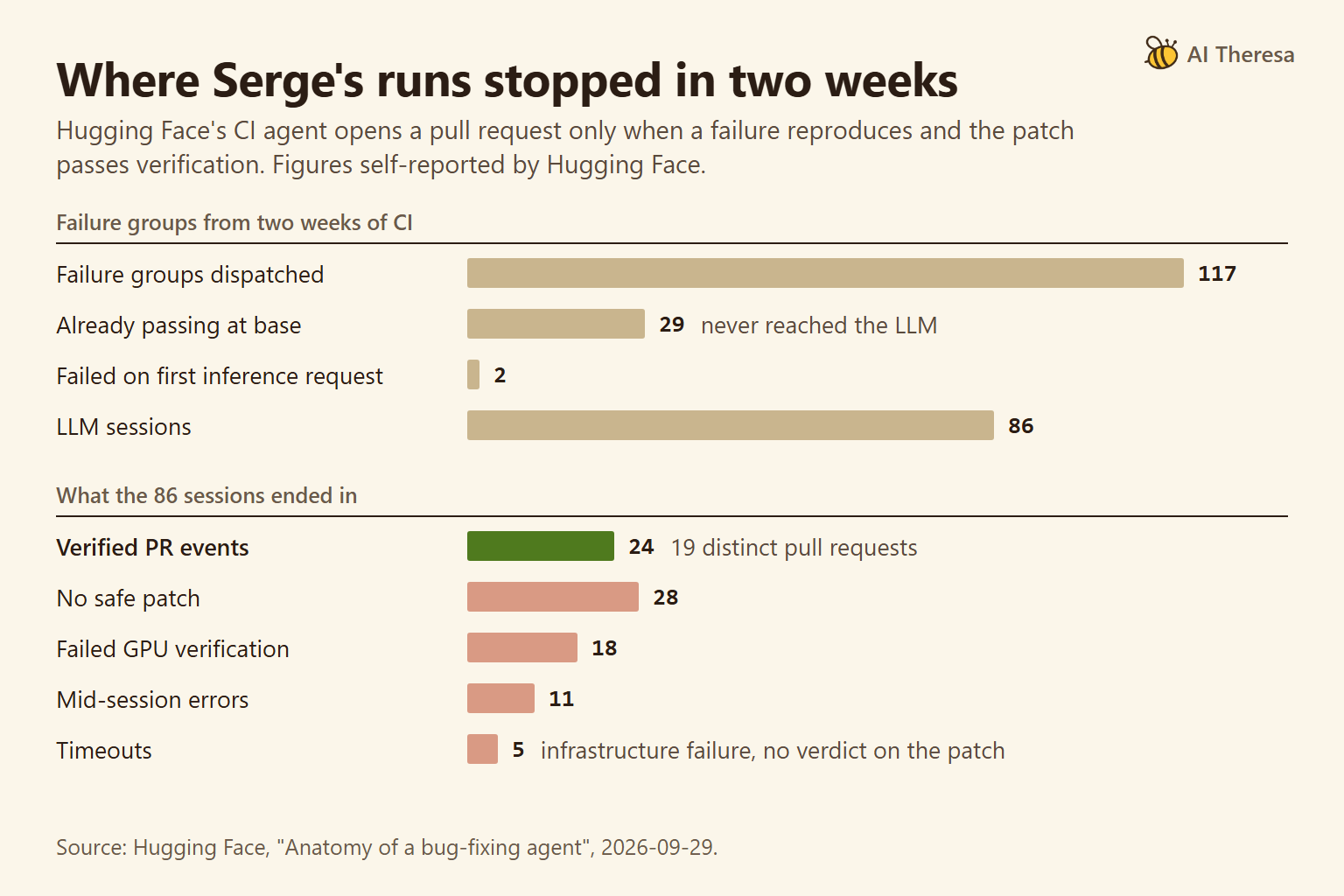
Serge filters the night's CI failures, then reruns each one on a GPU. In the team's words, "If the failure doesn't reproduce reliably, the task stops there."
2. Investigate and patch inside a sandbox
The agent runs in a pod with "no GitHub credentials and no cluster API token." It can only push serge/ branches and open pull requests. Its patch must also pass the project's lint and type checks.
3. Verify before and after
The failing test runs five times on the unpatched code and five times on the patched code. Timeouts and similar errors count as infrastructure failures, with no verdict on the patch. A patch that only changes expected values gets "extra suspicion," because editing an assertion can turn a test green without fixing anything.
4. Open a pull request for a person to merge
Nothing reaches main until a maintainer reviews and merges it. In one published case, a PvtV2 test expected an output shape copied from the older PVT model, so the test itself was wrong. Serge corrected the expectation, and maintainers merged it unchanged. Step 3 treats exactly this kind of patch with suspicion, which is why a person decides.
Other vendors place the gate differently. Databricks says its ZeroOps pipeline agent "will never change your code or data without your direct approval."
Waggle, our open-source auditor, also runs unattended, but read-only: it checks each suspected problem against the code and connected data, and reports a claim it cannot support as an open question. It does not run code or reproduce bugs, and it did not find the Windows bug. Its claim audit is a model checking a model, a filter rather than a test, so a person or a test still confirms each finding. Its Claude Code plugin adds a fix command that works on a branch, one commit per finding, asking before each step.
AI Debugging vs Traditional Debugging
Both follow the same method. Google's guide to effective troubleshooting calls it the hypothetico-deductive method: observe the system, form a hypothesis about the cause, test it, and repeat. The difference lies in who does each step and what counts as proof.
| Question | Traditional debugging | AI-assisted debugging | Where it breaks |
|---|---|---|---|
| Who forms the hypothesis? | The developer, from experience and the code | The model, from the code, logs and errors it can see | A plausible story fits the visible evidence and misses the rest |
| Where does evidence come from? | Breakpoints, logs, git bisect, reruns | The same tools run by the agent, plus its reading of the code | The agent misreads an output or skips a run |
| What proves the fix? | A reproduction that now passes, then review | The same when the agent runs it; only a summary when it does not | A report says "fixed" with no run behind it |
| What does it cost? | Developer hours spent searching | Model usage plus developer hours spent reviewing | Review time grows with large or unclear patches |
Deterministic tools keep their place. git bisect uses binary search to find the commit that introduced a bug. An agent can run it, and that run is stronger evidence than the agent's guess.
In the Windows case, the agent supplied the hypotheses and the developer supplied the proof. The check against the code, not the agent's explanation, decided what to skip and what to fix.
Get Started with Theresa for FREEBenefits of AI-Powered Automated Debugging
The first is a candidate cause for every failure, ready to check. In the Windows case, the agent proposed one for each of the six, and the developer checked them.
The second is repetitive, verifiable work done unattended. Hugging Face estimates Serge saved one to two hours of developer attention per fix, around 43 hours across 29 fixes. It reports roughly $14 per distinct pull request and $43 per merged one. These are the team's figures for one repository.
The third is scoped fixes for known alert types. A scanner alert carries its own check: rerun the scanner and see whether the alert closes. That makes alerts like CodeQL's a sensible first target for Level 3.
Explanations also help people judge patches. In the AutoSD study, 20 participants judged patches more accurately with explanations for five of the six real-world bugs studied.
Get Started with Theresa for FREEChallenges of Implementing AI Debugging
Tests that turn green for the wrong reason
Hugging Face says it does not "yet have a perfect automatic way to distinguish a legitimate expectation update from reward hacking." Reward hacking here means a patch that satisfies the check without fixing the bug. The PatchDiff study found that running all developer tests missed 82.7% of the suspicious patches it examined, meaning patches that behave differently from the developer's own fix.
The Windows case shows the temptation. Skipping all six tests would have turned the suite green and hidden the bug. We did skip five, each with the reason written in the test, and kept and fixed the sixth. Waggle still has no Windows CI job.
Inconclusive results stored as passes
A second bug, in Waggle's own engine, was quieter. When one part of a scan hit its budget cap, it stopped with a question unanswered. The run did not record the skip, and the next re-scan treated the question as already checked. An end-to-end test found it, not Waggle.
Hugging Face applies the same rule to timeouts: an inconclusive run gets no verdict and never counts as a pass.
Benchmarks that say less than they seem
OpenAI stopped reporting SWE-bench Verified scores in February 2026. Its audit of 138 problems that OpenAI o3 did not consistently solve across 64 runs found that at least 59.4% have flawed test cases that reject correct solutions. A benchmark score shows patches pass hidden tests, which is weaker evidence than a reviewed fix in your codebase.
Permissions and company knowledge
Claude Code's best-practices page separates checks the model decides from checks the tooling enforces. For "who has the last word", the enforced option is "branch protection, a person who approves the merge". For unattended agents, put the gate there and not in the prompt.
Our AI agent debugging guide covers what to log when an agent itself misbehaves. Databricks reports that over half of the pipeline issues it saw needed company-specific knowledge to fix. Theresa's forward-deployed engineering team works on that side of the problem, for example tracing untrustworthy dashboards to upstream schema drift for a client.
Get Started with Theresa for FREEConclusion
AI-powered automated debugging is a ladder. Each level lets the AI see more of your system and change more of it, from a pasted error to a branch and a pull request. The method underneath stays the same: reproduce the failure, test a hypothesis, and prove the fix.
Move a class of bugs up a level only when you have a check that does not depend on the model's own summary. That check can be a reliable reproduction, before-and-after runs, a scanner that closes the alert, or a person who merges. Where no such check exists, keep the AI at the level where someone still reads every change.