An AI agent works well in a demonstration: it reads a request, finds a record, and drafts an update. Then a second department asks to use it. Their permissions differ, their records contain different fields, and someone needs to know what happens when the agent gets halfway through a task and stops.
These are deployment questions. Getting an agent into production means connecting its behavior to the systems, people, and operating practices of the business. The model is one part of that work.
This guide covers the architecture and deployment choices available to enterprise teams in 2026, along with a practical route from pilot to production. The examples are illustrative; the platform descriptions link to current vendor documentation.
Quick takeaway: Enterprise AI agent deployment puts an agent into an environment where it can perform authorized work, recover from interruptions, and be monitored and updated. A successful launch makes those operating conditions as clear as the task itself.
What Is Enterprise AI Agent Deployment?
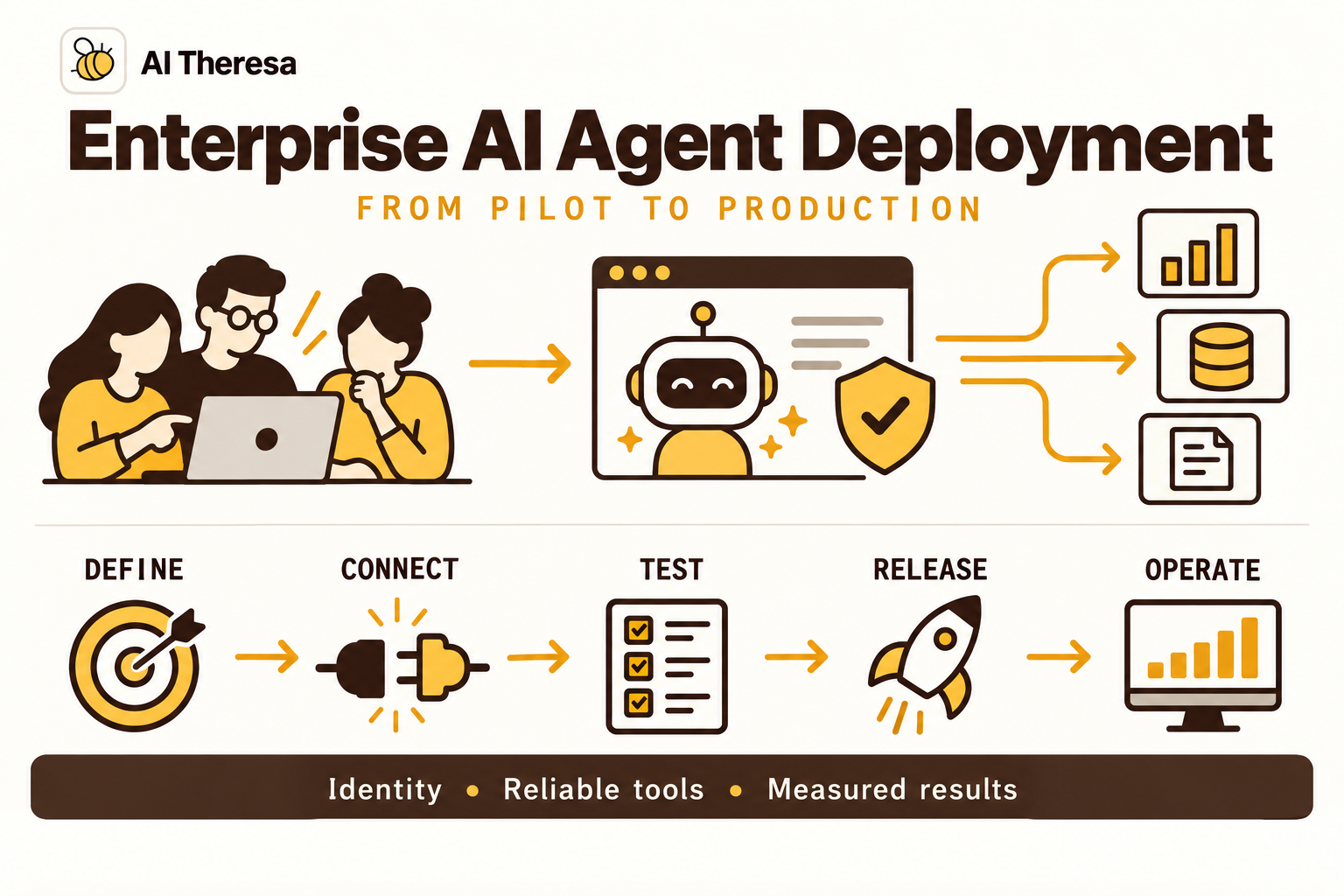
Enterprise AI agent deployment is the process of releasing and operating an AI application that can interpret a goal, use tools, and choose actions within a business environment. It includes the runtime, integrations, access controls, testing, and support arrangements needed for everyday use.
Deploying an agent differs from making a model endpoint available. A model endpoint accepts input and returns a prediction or generated response. An agent application may call that endpoint repeatedly, retrieve business records, wait for approval, and update another system. Each dependency becomes part of the service employees rely on.
Nor does deployment require complete autonomy. A production agent can investigate a request and prepare a proposed change for a person to approve. That can be a useful, finished product when judgment or accountability belongs with the employee.
The enterprise part concerns the conditions under which the application operates: multiple users, restricted information, shared infrastructure, and consequences when an action is wrong. Even a small agent used by one department needs a defined owner and a way to handle failed work.
Get Started with Theresa for FREEHow Does AI Agent Deployment Work?
Deployment has two connected parts: releasing the application and running individual tasks through it.
During release, the team packages the agent's code and configuration, provisions its environment, connects approved data sources, and assigns identities. It tests a version before making it available through a chat interface, business application, API, or event trigger.
At runtime, an illustrative service-request agent might follow this sequence:
- Accept the request. Identify the employee and establish which account or department the task belongs to.
- Load relevant information. Retrieve permitted records and the current instructions for the task.
- Choose a step. Ask the model to propose an action from the available tools.
- Execute through application controls. Validate the request, enforce permissions, and obtain any required approval.
- Confirm the result. Save the returned record or action receipt, then finish, continue, or hand the case to a person.
A deployment must also accommodate less tidy paths. The employee may close the browser while work continues. A connector may become unavailable. Approval may arrive the next morning. Task status should survive those interruptions and tell users whether work is pending, complete, or needs attention.
Releasing a new version should not silently change the rules for an old task waiting for approval. Decide how existing runs will finish before directing new requests to the replacement version.
Get Started with Theresa for FREEWhy Deploy AI Agents in Enterprises?
The strongest opportunities involve recurring work where people spend substantial time interpreting requests and assembling information before they can act.
Reduce investigation time
A service team might search several applications to understand one customer issue. An agent can gather the relevant history, identify missing details, and prepare a useful case summary. The benefit is the investigation time saved after the employee has checked the result.
Make business systems easier to use
Employees often know what they need but do not know which form, queue, or application handles it. An agent can interpret a request and guide it into the right process. This is especially useful when the same work arrives through different channels or in inconsistent language.
Keep work moving between teams
An agent can carry context across handoffs, record completed steps, and identify the next person needed. A colleague receives a specific decision with supporting information rather than an unstructured message asking them to investigate from scratch.
These benefits are possible, not automatic. Compare the agent with the current process, including review time and corrections. If the job is a stable sequence of straightforward rules, conventional automation may deliver the result with less operational complexity.
Get Started with Theresa for FREEKey Components of AI Agent Deployment
The following components need to work together, whether you build them yourself or obtain them through a platform.
Agent logic and model access
The application defines the task, available tools, stopping conditions, and handling of unexpected results. The model interprets context and proposes steps. Keep prompts and tool definitions under version control alongside the code so a behavior change can be traced to a release.
Model access also needs operational settings: timeouts, usage limits, and a response when the provider is unavailable. Switching to another model can change behavior, so evaluate a fallback before relying on it.
Business context and integrations
The agent needs authoritative information and tools that return predictable results. Use live lookups for changing records such as ticket status. Searchable documents are useful for policies and instructions, provided the retrieval process respects access permissions.
A write tool should clearly identify the destination record and allowed fields. Separate reading a customer record from modifying it; the two capabilities need not share the same permissions.
Runtime and persistent state
The runtime hosts the application and manages execution capacity. Persistent state records where a task has reached, including any pending approval. For example, LangGraph supports checkpoints that preserve execution state and enable interrupted workflows to resume.
Choose storage that survives the failures you expect to recover from. A process-local conversation history is not a substitute for a durable task record.
Identity and observability
The system must know who requested work, which identity performs each action, and what access applies. An agent running overnight still needs a restricted service identity even when no employee is currently signed in.
Operational records should connect a request to its model calls, tool results, and final outcome. They help the support team investigate failures without asking employees to reconstruct the entire interaction.
Get Started with Theresa for FREETypes of Enterprise AI Agents
Classifying agents by the work they perform is often more useful than classifying them by model or framework. These categories can overlap.
| Agent type | Typical work | Deployment priority |
|---|---|---|
| Research and knowledge agent | Search approved sources, compare findings, and answer questions with evidence. | Source access, freshness, and traceable answers. |
| Employee service agent | Interpret requests and guide people through IT or workplace processes. | User identity, useful handoffs, and application integration. |
| Operational agent | Investigate exceptions and prepare or execute business updates. | Action permissions, approvals, and recovery from partial completion. |
| Software engineering agent | Inspect code, propose changes, and run permitted development tools. | Isolated execution, repository permissions, and review before release. |
A knowledge assistant that follows a fixed search-and-answer sequence may have little autonomy. An investigative agent can decide which sources or tools to use next. Describe that distinction when setting expectations with users.
You can also divide a task among several agents. This helps when subtasks need different context or specialist tools, but it adds coordination and shared-state problems. Start with the simplest arrangement that completes the work. Several agents do not remove the need for one clear result and one accountable application owner.
Get Started with Theresa for FREEEnterprise AI Agent Architecture
A practical architecture separates the user interface, agent execution, and access to business systems. This lets you change the model or interface without giving either direct authority over every connected application.
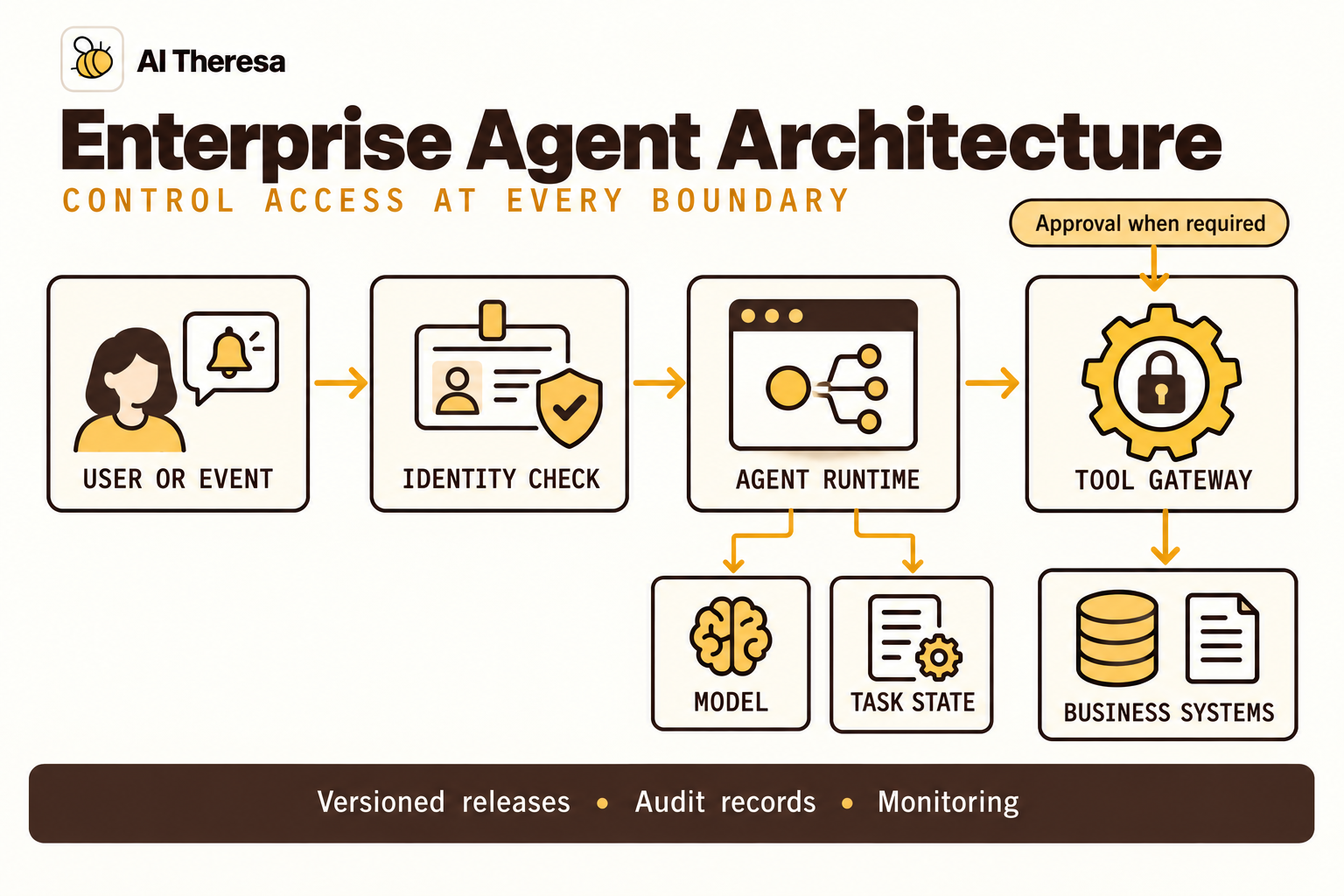
The entry point authenticates users or validates incoming events. The runtime loads the task state, prepares context, and calls the model. Proposed tool calls pass through an execution layer that checks arguments, permissions, and business rules. A tool gateway can provide a common place for these checks, while destination systems continue enforcing their own access controls.
Keep authentication separate from authorization. Recognizing an employee does not establish that they may modify every record the agent can reach. Check the relevant account, action, and resource at execution time, especially after a long wait for approval.
Plan for long tasks and duplicate events
Interactive requests may finish quickly; investigations can require background workers and queues. Assign stable task identifiers so the interface can show progress after a page refresh or connection loss.
Queues and APIs can deliver work more than once. Use deduplication or idempotency mechanisms where supported, and retain action receipts. If a write times out, determine whether it succeeded before repeating it. Restarting the agent's code does not undo a change already made in the destination system.
Follow the data beyond the runtime
Document where prompts, retrieved documents, task state, and traces travel. A privately hosted application can still transmit information to an external model API. A monitoring service may retain copies of tool responses. These flows belong in the architecture review, alongside the application's main database.
Separate development, evaluation, and production credentials. Test environments should let engineers reproduce failures without accidentally updating live customer records.
Get Started with Theresa for FREEAI Agent Deployment Models
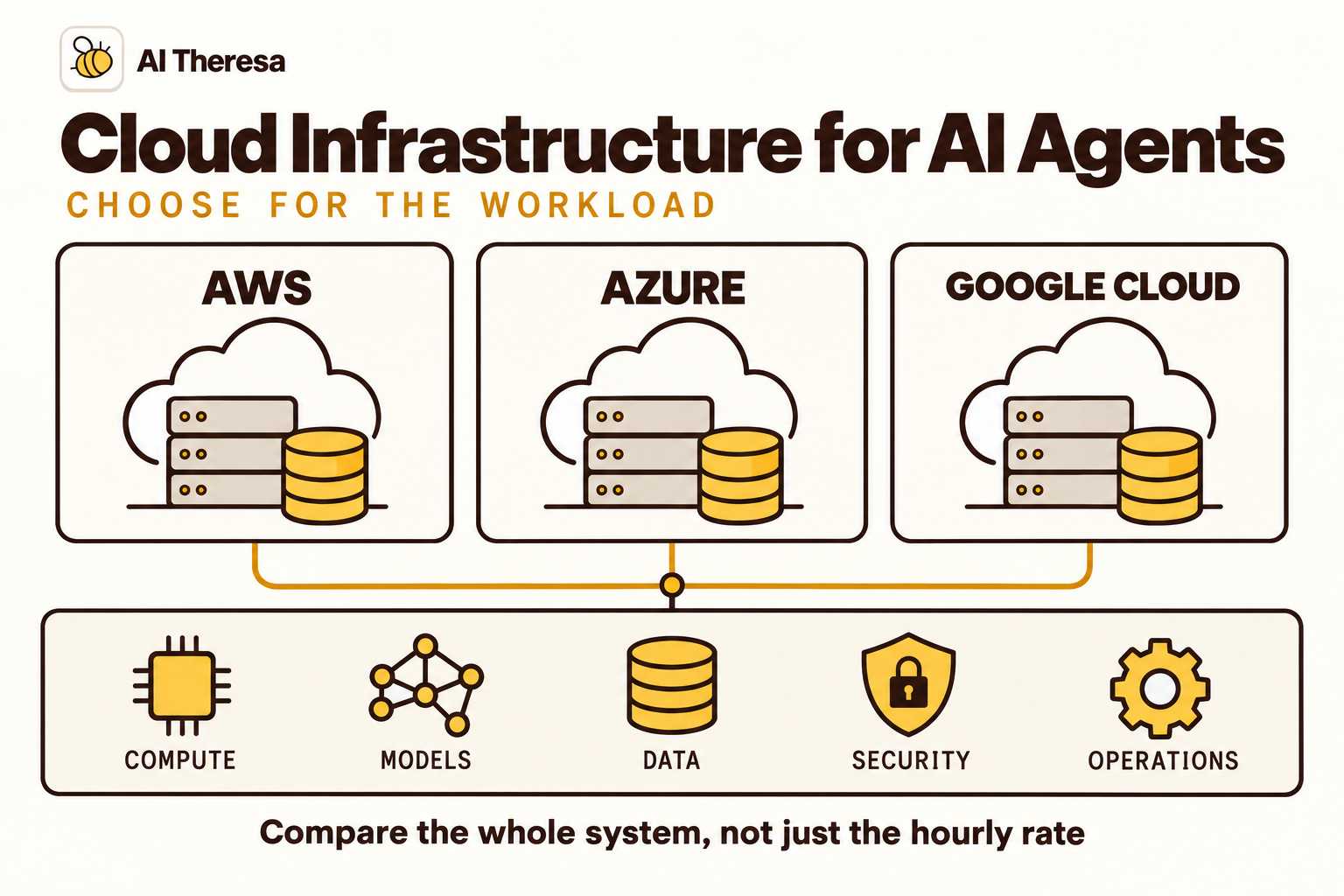
Choose a deployment model based on the systems you must reach, the data you may send, and the operations work your team can support. Agent hosting and model hosting are separate decisions.
Managed agent services
A provider operates much of the runtime infrastructure. Your team still defines agent behavior, configures access, maintains integrations, and evaluates outcomes. Managed services can reduce the work of provisioning and scaling execution, though features and network options differ.
Current options worth comparing include:
| Platform | Documented capabilities | A question for your evaluation |
|---|---|---|
| Amazon Bedrock AgentCore | Modular services for runtime hosting, identity, tool access, memory, and observability. | Can the selected services reach your applications with the permissions and isolation you require? |
| Microsoft Foundry Agent Service | Managed deployment for prompt agents and hosted agent code, with agent lifecycle and tool support. | Which deployment and networking configuration fits your Azure environment? |
| Google Gemini Enterprise Agent Platform | Managed Agent Runtime, sessions, memory, evaluation, and monitoring capabilities. | Which controls are available for every service your application will use? |
Check individual services rather than assuming one platform-wide guarantee. Google's documentation, for example, lists security capabilities separately for runtime, evaluation, sessions, and other services. Microsoft's networking guide distinguishes public access and private networking arrangements and notes tool-specific limitations.
Self-hosted deployment
You operate the agent application on your own cloud infrastructure or on-premises systems. This gives your team direct control over runtime configuration and network placement, with responsibility for capacity, patching, monitoring, and recovery.
Self-hosting the agent does not necessarily mean self-hosting the model. Calling a managed model remains an option if the data flow is acceptable. Running model inference yourself adds separate hardware, serving, and model-maintenance work.
Hybrid deployment
A hybrid design places different components in different environments. An agent might use cloud-hosted inference while a restricted service near an internal database handles authorized lookups. This can accommodate legacy systems without exposing an entire network.
The tradeoff is coordination across boundaries: network reliability, identity propagation, latency, and troubleshooting. Test the complete path, including failure behavior, before choosing this design on the strength of a diagram.
Agents inside existing business platforms
An agent embedded in a CRM or service-management product may be easier to introduce when most of its work stays there. Inspect how its permissions, audit history, and external integrations fit your process. Extending it across departments can expose limits that were invisible in the initial use case.
Get Started with Theresa for FREEHow to Deploy Enterprise AI Agents
A useful rollout creates evidence at each stage, with clear conditions for moving forward.
1. Define the first production task
Choose a recurring problem with a recognizable finish. For an internal service agent, that might mean correctly classifying a request, gathering the required details, and preparing a complete ticket.
Review recent examples with the team doing the work. Record completion time, common mistakes, and review effort. Agree on which actions the agent may perform and which decisions remain with people.
2. Select the environment and integrations
Map the required data flows and choose the deployment model. Confirm that the intended region, network configuration, connectors, and model endpoints support the design. Provision separate environments and restricted identities before connecting production data.
Test the tools independently of the model. A connector returning an incomplete record should fail clearly rather than leave the agent to guess what is missing.
3. Build an evaluation set
Use representative requests with expected outcomes, including difficult cases. Test missing information, similar customer names, conflicting records, denied access, tool failures, and tasks that should be handed to a person.
Measure correct completion as well as answer quality. An agent that writes a fluent response after updating the wrong ticket has failed. Repeat important cases to observe variation, and retain failures for future regression checks.
4. Package and review the release
Record the code version, prompts, model configuration, tool schemas, and relevant dependencies. Run integration and permission checks in staging, including recovery after interruption.
Define rollback behavior before launch. Restoring an earlier application version may stop a faulty behavior, but it will not reverse emails sent or records changed. Identify how affected tasks will be found and corrected.
5. Pilot with real users
Begin with a limited group and provide a clear support route. A read-only pilot can validate retrieval and recommendations; proposed writes can then be reviewed before execution. Show reviewers the actual change and its supporting evidence.
Watch for work the agent creates elsewhere. A faster front-end response is less useful if another team must spend longer correcting the result.
6. Operate and expand deliberately
Monitor task completion, error patterns, review rates, latency, and cost per completed case. Set alerts for failed integrations, unusual tool activity, and runaway execution. Establish who can pause the agent and who investigates incidents.
Retest changes to models, tools, and policies. Expand only when the next group or workflow has been evaluated on its own terms. If implementation crosses several unfamiliar systems, FDE as a Service can provide engineering capacity for integration and handover.
Get Started with Theresa for FREEChallenges of Enterprise AI Agent Deployment
Several problems become more visible after an agent reaches real users.
Security and unintended instructions
Documents, websites, and incoming messages can contain instructions that attempt to redirect the agent. OWASP identifies this as prompt injection and recommends controls such as limited privileges and approval for high-risk actions.
Treat external content as data. Keep credentials out of model context and enforce access in the application and destination systems. Filters and prompt instructions can help, but they should not be the only barrier between a malicious document and a privileged action.
Inconsistent results and changing data
A model may choose different steps for similar requests. Policies and source records can also change between retrieval and execution. Preserve the evidence behind a proposal and recheck time-sensitive facts before acting. Investigate repeated failures by component: retrieval, model decision, tool behavior, or integration.
Cost, latency, and operational load
Multiple model calls, repeated searches, and long-running tasks can make usage difficult to predict. Track the distribution of run costs, including expensive outliers. Limit unnecessary retries and watch for queues that grow faster than reviewers can clear them.
Adoption and maintenance
Employees need to understand what the agent can do, where a task stands, and how to correct it. Confusing handoffs can undermine an otherwise capable system. Keep an owner for the workflow after launch, and retire agents whose integrations or business purpose are no longer maintained.
Get Started with Theresa for FREEConclusion
Enterprise AI agent deployment brings an application into the conditions where a business will actually use it: real identities, changing records, interruptions, and ongoing releases. The hosting platform helps, but the surrounding design determines whether employees can depend on the result.
Start with a task you can measure. Build the integrations and operating controls around it, test the awkward cases, and introduce the agent to a limited group. Use what happens in production to decide where to improve and what to deploy next.