Choosing cloud infrastructure for an AI agent starts with a practical question: where does the work happen? An agent answering questions from public documents has different needs from one investigating customer records, running code, or waiting overnight for approval.
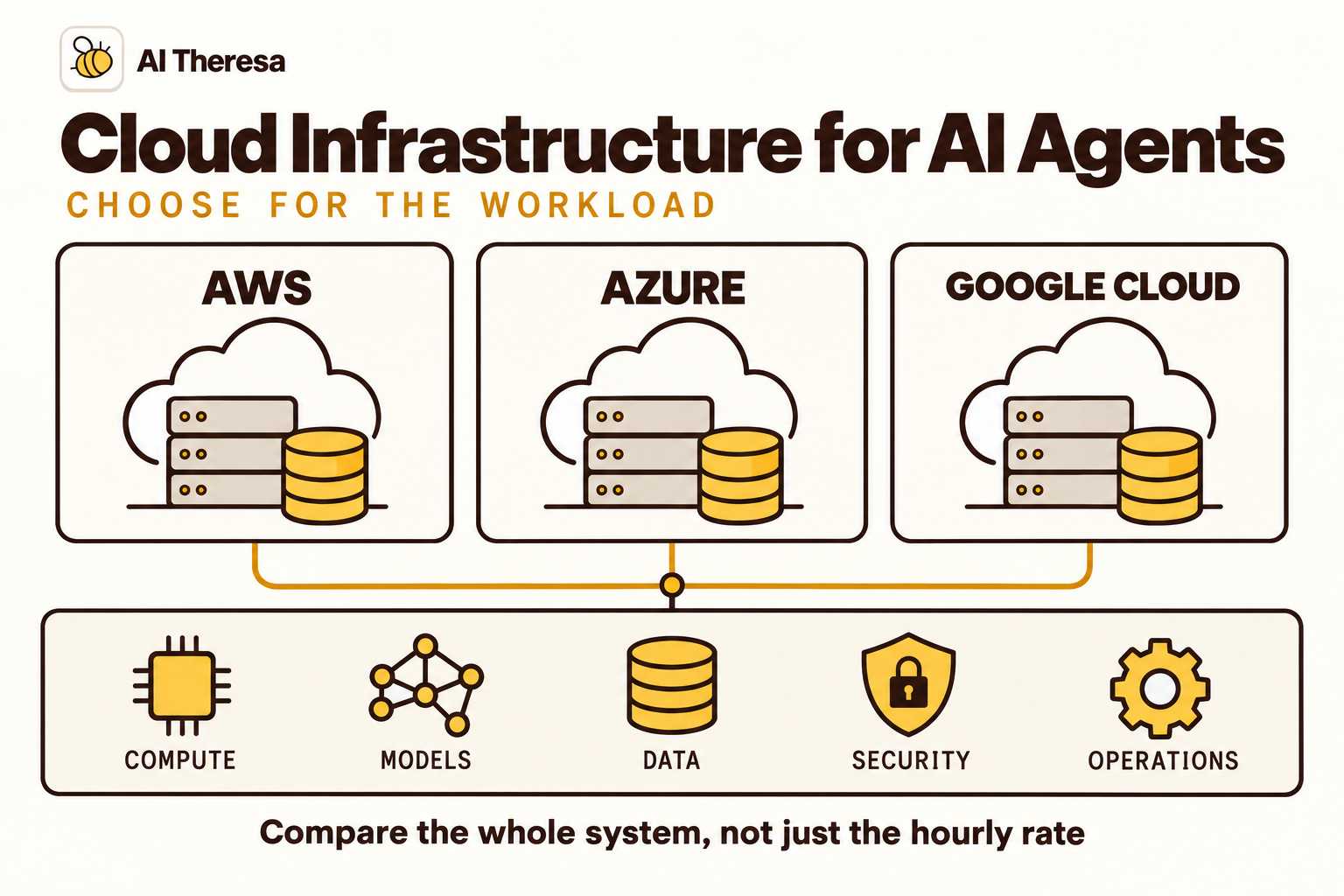
AWS, Microsoft Azure, and Google Cloud all offer ways to host agents and connect them to models and business systems. The best choice depends on your workload, existing infrastructure, and operating team. A low runtime price can lose its appeal if the deployment requires expensive data movement or months of integration work.
This guide compares the three providers and explains what to check before committing. Product and pricing references were reviewed on October 11, 2026. Recommendations reflect the deployment requirements discussed here, rather than a claim that one cloud wins every benchmark.
Quick takeaway: Start with the cloud that already holds your data and applications, then test whether its agent services meet your requirements. Compare complete workflows, including model calls, storage, networking, and operations, before choosing on price.
What Is AI Agent Cloud Infrastructure?
AI agent cloud infrastructure is the collection of computing, storage, networking, and managed services that lets an agent run reliably and interact with other systems. It hosts the application around the model and supports the work that happens before and after a model call.
An agent may receive a request, retrieve documents, choose a tool, check its result, and continue. Infrastructure provides a place to execute those steps, preserve progress, enforce access, and record what happened.
Agent compute and model compute are different
An agent application can call a hosted model API without running that model on its own servers. Its runtime may need ordinary CPU and memory for orchestration, API requests, and state management. It does not automatically need a GPU because it uses AI.
Hosting model inference yourself changes the calculation. You must provide the accelerators or other compute the model requires, load its weights, and manage serving capacity. That is a separate infrastructure decision from where you host the agent's application code.
Managed services and custom infrastructure
A managed agent runtime handles some hosting and execution concerns for you. A custom deployment gives you more direct control over the application environment, using containers, virtual machines, or an existing internal platform.
Both approaches still need business integrations and an operating process. A hosted runtime cannot determine which customer records an employee should see or whether a proposed order change is acceptable. Those decisions must be represented in your application's permissions and rules.
Get Started with Theresa for FREEHow Does AI Agent Infrastructure Work?
Consider an agent helping a service team investigate an account issue. The infrastructure has to support a sequence of interactions, with a clear connection between the original request and the final result.
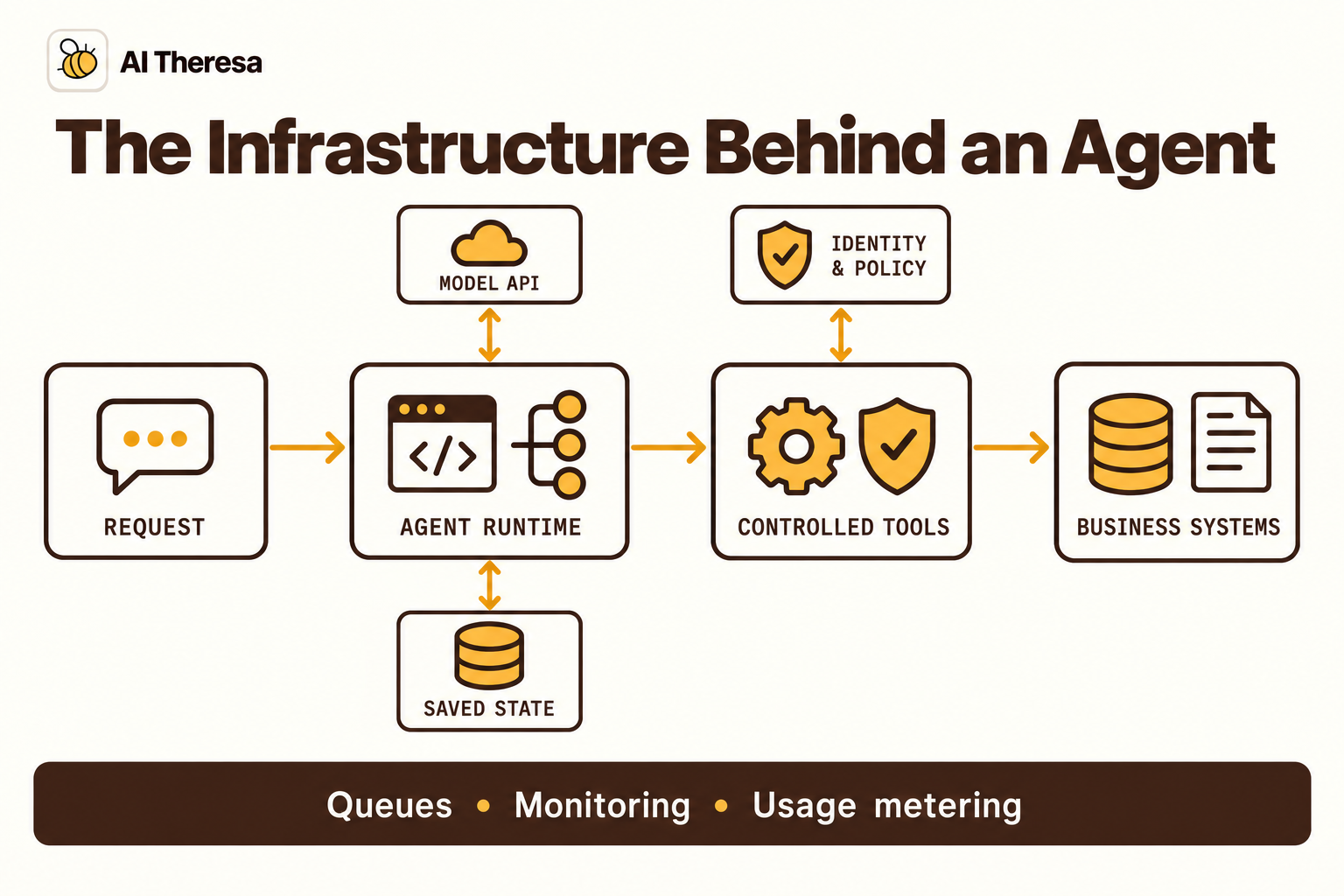
Requests enter an authenticated application
An employee submits a request through a chat interface or business application. The entry point identifies the user, assigns a task identifier, and starts a run. An event-driven task follows a similar path, using an authorized service identity rather than assuming every incoming event is trustworthy.
Some runs can finish during an interactive request. Others need a queue and background worker so they can continue after the employee closes the page. The interface should display their status without requiring a new task to be created.
The runtime coordinates models and tools
The runtime loads relevant context and calls the model. If the model proposes a tool action, application controls validate it before execution. A tool might query account history, search a document collection, or prepare a ticket update.
The runtime then processes the result and decides whether to continue. A task may involve several model calls, so one user request is not necessarily one billable inference request. Tool failures and retries can increase both elapsed time and consumption.
State and records survive interruptions
Save task progress outside any process that might disappear. A record should distinguish an action that was requested from one that was confirmed. When an API times out after a write, the application must establish whether the write succeeded before repeating it.
Persisting conversation history is useful, but it does not by itself make external actions safe to retry. Use destination-system receipts or idempotency mechanisms where available.
Monitoring follows the complete task
A useful trace connects the user request to model calls, tool results, and the outcome. It helps answer whether a slow task waited on inference, a database, or a person.
Measure success at the application level. A healthy server and successful HTTP responses do not prove that the agent selected the right account or completed the intended update. Infrastructure metrics and task-quality evaluations answer different questions.
Get Started with Theresa for FREEHow to Choose the Right Cloud Platform
Compare providers against one representative workflow. A broad feature checklist can make three platforms look interchangeable while missing the constraint that actually determines your deployment.
Start with data location and existing systems
List the applications, databases, and documents the agent needs. Identify the authoritative source for each field and the network path used to retrieve it. Keeping execution near those systems can reduce integration work and avoid unnecessary transfers.
Existing cloud skills matter too. A team that already operates identity, networking, and monitoring in one provider may ship a dependable agent sooner there. Moving to another cloud is worthwhile when a specific capability justifies the additional work.
Match hosting to the workload
Short, irregular requests benefit from infrastructure that can handle bursts without maintaining excessive idle capacity. Longer investigations need durable state, asynchronous execution, and a way to resume after an interruption.
Agents that execute code need an appropriately isolated environment. Agents that host models need a separate inference-capacity plan. Do not assume that the hosting configuration for a text assistant will also suit a software engineering agent running large builds.
Test scalability across the entire path
Autoscaling the runtime will not remove a model quota or increase the request limit of your CRM. Trace the capacity of every dependency: concurrent agent runs, model throughput, retrieval services, and business APIs.
Test the busiest realistic period, including retries. Measure how long tasks wait and whether the system sheds load clearly when it cannot keep up. A bounded queue is often more useful than allowing every request to launch additional work indefinitely.
For interactive agents, include cold-start behavior and the time to the first useful response. For background work, prioritize completion time and recovery. These are different service goals and can lead to different infrastructure choices.
Examine security at the service level
Check who can invoke the agent, which identity calls each tool, and which records that identity can access. Keep secrets in the execution environment and narrow permissions to the work being performed.
Network privacy also needs a precise definition. A private inbound endpoint does not necessarily restrict outbound traffic. Follow the path from the runtime to the model, tools, storage, and monitoring service. Identify where data is processed and retained, including copies in logs.
Confirm controls for each service you plan to use. Platform branding is not evidence that every runtime, memory feature, search connector, and evaluation service has identical regional or encryption options.
Decide what must stay available
A support agent used during business hours and an agent coordinating overnight operations may need different recovery arrangements. Define how long the business can wait, which tasks can be queued, and when employees should use the existing manual process.
Test a dependency failure before adding another region. A second runtime location helps little if both deployments depend on the same unavailable database or model endpoint. Regional failover also needs compatible data access and permissions, plus a way to prevent two workers from applying the same change. Document which components recover automatically and which require an operator. Keep that procedure short enough to use during an incident.
Compare the complete bill
Build an estimate from measured usage rather than a single advertised rate:
| Cost category | What to include |
|---|---|
| Model inference | Input and output tokens, repeated calls, embeddings, and any reserved capacity. |
| Agent execution | CPU, memory, session duration, minimum capacity, and specialized execution tools. |
| Data and tools | Storage, retrieval, database queries, memory operations, and paid external APIs. |
| Network and operations | Transfers, private connectivity, logs, evaluation, support, and engineering maintenance. |
As an illustrative budgeting exercise, suppose 10,000 completed tasks each use five model calls. That produces 50,000 calls before retries or evaluations. If each call averages 2,000 input tokens and 400 output tokens, the model estimate starts at 100 million input and 20 million output tokens. Apply your chosen model's rates, then add the other categories.
Use cost per correctly completed task alongside the monthly bill. A cheaper configuration that produces more corrections can cost the business more overall.
Check operational control and portability
Ask how you will deploy a new version, inspect a failed run, export task records, and disable a problematic tool. Test these operations during the pilot, while changes are still inexpensive.
Keep business rules and tool contracts understandable outside the provider's console. Portability does not require avoiding managed services; it requires knowing which state, identities, and integrations you would need to rebuild if the hosting arrangement changed.
Get Started with Theresa for FREEBest Cloud Platforms for AI Agents
AWS, Azure, and Google Cloud are sensible enterprise starting points because they offer agent services alongside broader infrastructure. The fit assessments below are editorial recommendations based on the documented capabilities and integration considerations, not comparative performance measurements.
| Platform | Strong starting point when… | Main question to resolve |
|---|---|---|
| AWS | Your applications already run on AWS and you want flexible agent hosting. | Which runtime compute type and supporting services fit the workload? |
| Azure | Your organization relies on Azure and Microsoft-managed identity and business systems. | Which agent type, connectors, and network configuration meet the requirements? |
| Google Cloud | Your data and AI work already sit in Google Cloud and you want managed agent services. | How should runtime resources, model capacity, and data controls be configured together? |
AWS: a strong fit for flexible hosting on an existing AWS estate
Amazon Bedrock AgentCore Runtime supports custom agents and multiple frameworks and model providers. Its documented compute options include serverless microVMs and managed EC2 Instances for workloads requiring different execution characteristics.
MicroVMs are worth evaluating for isolated sessions and variable demand. Instances address cases such as longer-running work, specialized compute, or collaborating agents sharing an environment. AWS also documents agent identities and tracing of model interactions and tool calls.
The practical attraction is the ability to choose an execution approach without treating every agent as the same kind of application. A customer-service investigation and a coding task that needs a substantial build environment may use different infrastructure while staying within the same cloud.
What to test: exercise the chosen compute type with realistic session lengths, memory use, and concurrency. Check access to private applications and the handling of session termination. Keep a durable record of business actions regardless of how long the runtime preserves its local environment.
AWS is a reasonable first choice when your team can reuse established accounts, networking, and operating practices. If those foundations are absent, include their setup in the project estimate. A modular service portfolio provides options, but someone still has to select and configure them.
Azure: a strong fit for Microsoft-centered enterprise environments
Microsoft Foundry Agent Service offers managed paths for prompt agents and hosted agent code. This gives teams a choice between defining behavior within the platform and bringing an application with its own implementation.
Azure deserves an early evaluation when the agent must work within an existing Microsoft environment. The potential benefit is reducing the number of unfamiliar identity and operations systems the team must introduce. That advantage depends on the actual connectors and permissions needed; access to one Microsoft product does not automatically grant access to another.
Networking deserves attention before the prototype becomes the production design. Microsoft's Foundry networking documentation separates public egress, a customer-managed virtual network, and a managed virtual network. It also explains that a private endpoint with public egress restricts inbound access without isolating outbound traffic.
What to test: use the proposed production network configuration and the real set of tools. Confirm that requests reach private resources, that unauthorized records remain inaccessible, and that identity is preserved through handoffs. Review tool-specific network limitations rather than testing only the agent's chat endpoint.
Azure is particularly attractive when existing organizational expertise makes those tasks straightforward. For a small team with little Azure experience, compare the integration benefit with the administration involved. The appropriate choice may still be Azure, but the pilot should demonstrate that fit.
Google Cloud: a strong fit for an integrated data and AI environment
Gemini Enterprise Agent Platform provides managed runtime, sessions, memory, evaluation, and monitoring services. Its documentation also distinguishes security capabilities across individual services, which helps teams review the complete design rather than treating the platform as one uniform boundary.
Google's deployment documentation exposes controls for application instance counts, container resources, and concurrency. These settings give engineers concrete ways to tune execution, although available ranges and behavior depend on the configuration.
This is a useful starting point when the agent depends on data and applications already operated in Google Cloud. Keeping the workflow there can let the team reuse its data-access practices and monitoring arrangements. Validate the proposed model, retrieval process, and tool execution as a complete task.
What to test: observe how concurrency affects latency and downstream systems. Increasing application capacity may simply generate model throttling or overload a database. Review the security matrix for every selected service and confirm processing and storage locations for the actual deployment.
Google Cloud is worth shortlisting for teams seeking managed execution with explicit resource controls. It still requires application-level decisions about authorization, retries, and approval. Those responsibilities remain even when the provider manages the servers.
Pricing comparison: published rates and what they exclude
The following USD examples were checked on October 11, 2026. They describe specific billing components, not equivalent complete deployments. Verify your region, agreement, runtime version, free allowances, and selected services before budgeting.
| Service | Published pricing example | Additional costs to consider |
|---|---|---|
| AWS AgentCore Runtime microVMs | V1: $0.0895 per vCPU-hour and $0.00945 per GB-hour. V2 consumption: $0.1276 per vCPU-hour and $0.0169 per GB-hour. | Model inference, storage, network traffic, and separately metered capabilities. |
| Azure Foundry Agent Service | No additional agent-service charge for Foundry-native prompts and workflows; hosted agents incur container-compute charges. Obtain the applicable regional rates in Azure's pricing tools. | Model tokens, tools, knowledge connections, and relevant licenses. |
| Google Agent Runtime | Listed standard rates: $0.085 per vCPU-hour and $0.009 per GiB-hour, subject to free allowances and the applicable consumption model. | Model usage and separately billed data, gateway, memory, or other services. |
Billing behavior matters as much as the rate. AWS distinguishes consumed resources and runtime versions; Google's page describes allocated runtime resources and excludes idle time between turns. These differences prevent a clean cheapest-provider conclusion from the table. GB and GiB are also different units.
For a deliberately limited arithmetic example, 100 billable vCPU-hours and 200 billable GiB-hours at Google's listed standard rates total $10.30 before allowances and other charges. That calculation says nothing about how many useful tasks the resources complete. Use measured runs to connect consumption to your workload.
Azure's lack of an additional charge for certain native-agent execution does not make the application free. Model and tool usage still contribute to the bill. Similarly, inexpensive runtime compute on any cloud can sit beside a much larger inference or retrieval bill.
When custom hosting is the better choice
Managed agent services are not mandatory. A team with an established container platform may prefer to host its orchestration code there and call model APIs separately. This can be a sensible option when the workflow is simple or the runtime needs unusual dependencies.
Compare the work honestly: patching, capacity management, task recovery, identity integration, and monitoring must be supplied somewhere. Custom hosting is attractive when the team already has those capabilities, rather than when it merely appears cheaper on a compute calculator.
Run a pilot that can settle the decision
Shortlist two plausible configurations and run the same representative tasks. Keep the model and task logic comparable where practical, then test each provider's deployment, access controls, and recovery behavior. Record any differences that prevent a fair comparison.
Include a burst of requests, a slow tool, and an interrupted task. Compare correct completion, response times, total consumption, and the effort required to diagnose problems. Use the results to choose a platform your team can operate. If integrations are the main obstacle, forward-deployed engineering support may matter more than switching cloud providers.
For example, an account-support pilot should include straightforward lookups, missing records, and cases needing approval. Record the resources consumed on each platform by each category instead of reporting only an overall average. A handful of difficult cases can account for a disproportionate share of spending and support effort.
Ask the people who will operate the service to deploy a revision and investigate a failed case themselves. Their experience reveals whether the platform fits your team's skills. Capture the final configuration with the results so a later model or runtime change can be compared against the same baseline. This also makes the purchasing decision easier to explain internally.
Get Started with Theresa for FREEConclusion
The best cloud infrastructure for AI agents is the one that supports your actual workflow at an acceptable cost and operating burden. AWS offers flexible execution options, Azure deserves consideration in Microsoft-centered environments, and Google Cloud provides a managed path alongside its data and AI services.
Start with your existing systems, identify the constraints that matter, and test a complete workflow. Choose based on verified task performance, security configuration, and total cost. That gives you a more useful answer than a ranking based on one runtime rate or a long list of features.