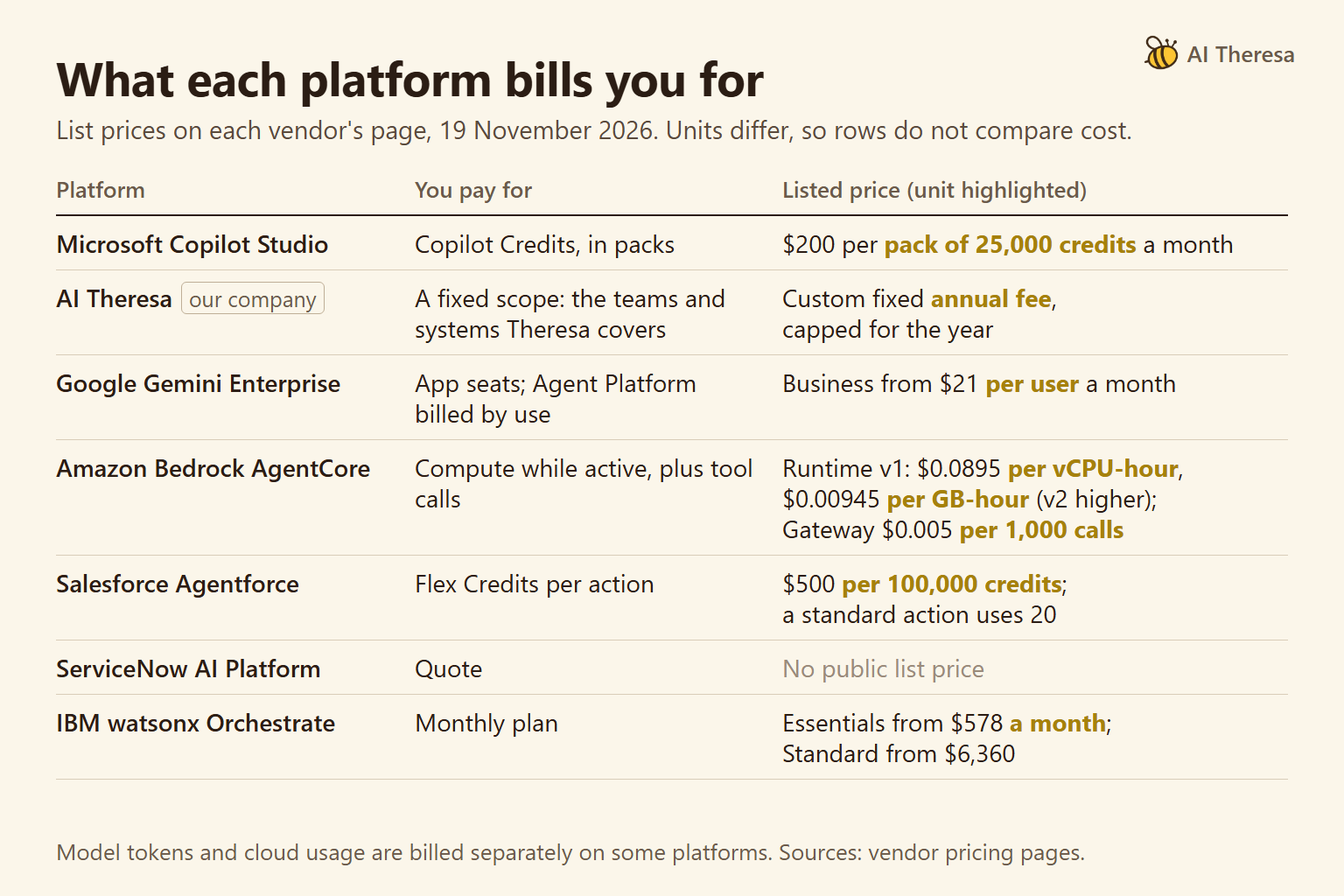
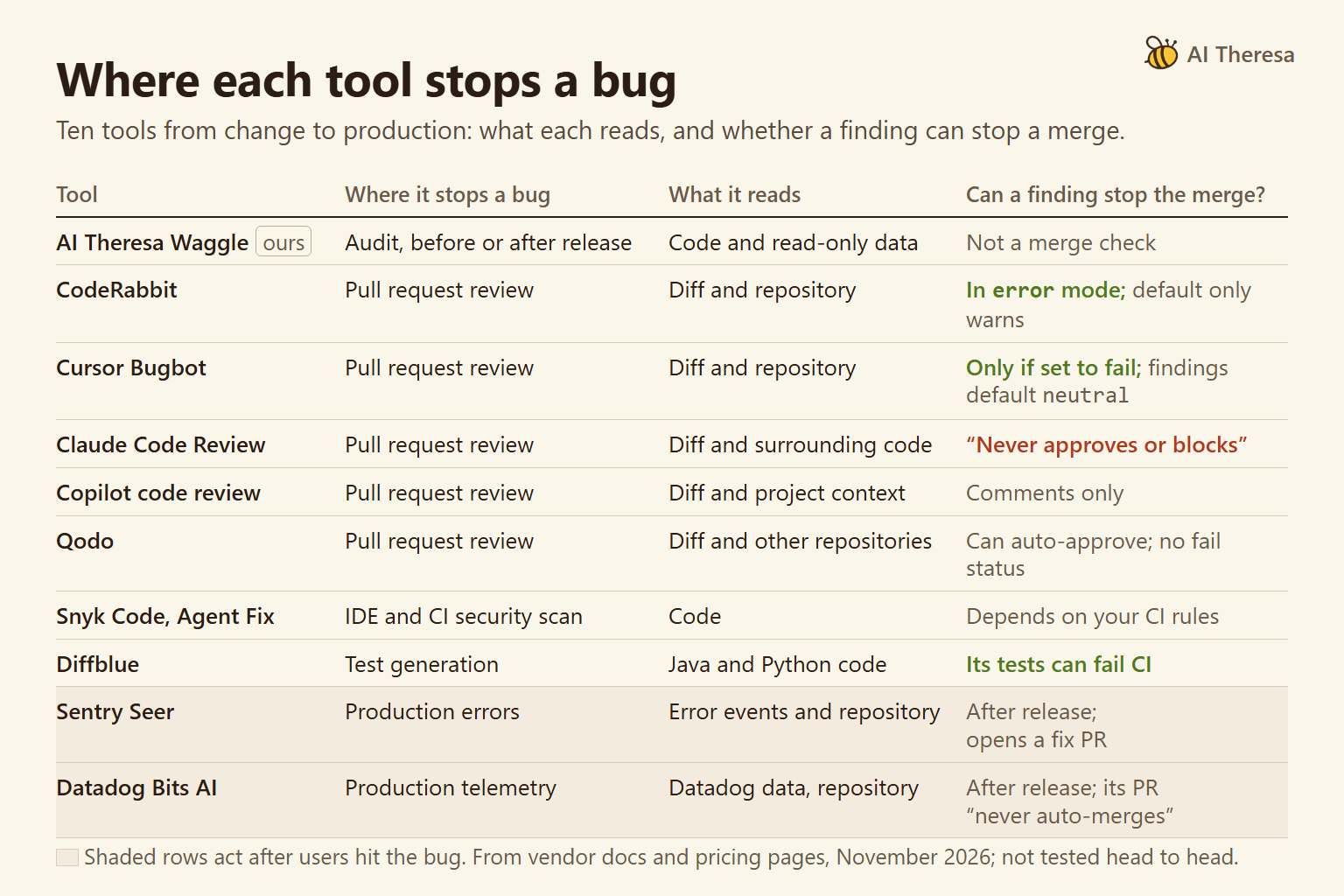
AI tools for reducing production bugs check your code at different points before and after release. Some review each pull request. Others write tests, scan for security flaws, or watch production errors and propose a fix. Each one stops a different kind of bug at a different stage.
A recent postmortem shows the weak point. At Tuist, continuous integration caught a migration clash two hours and fifteen minutes before it reached production, and the company wrote: "Nothing acted on that signal." A tool helps only when its check runs where the bug lives and something blocks the release on its result. A small team with few incidents and strong CI may need only branch protection and one review bot.
This guide ranks ten tools by the stage where they stop a bug. It follows one real bug from our own open-source project along the way.
What Are AI Tools for Reducing Production Bugs?
AI tools for reducing production bugs use language models to find, test or explain defects before or after code reaches users. A language model is AI trained on large amounts of text and code. It can read a change and reason about what the change does.
You will meet five kinds. Pull request review bots read each proposed change and comment on likely bugs. Test generators write unit tests that run in continuous integration (CI), the automated build that runs on every change. Security scanners flag flaws and draft fixes.
Monitoring tools watch production errors and propose a root cause. Code and data auditors read the code next to the data it touches, which is where some bugs hide.
Changes cause most of the trouble. Google's SRE team reports that roughly 70% of outages are due to changes in a live system. The 2025 DORA report on AI-assisted software development found that AI now improves delivery throughput. "However, it still increases delivery instability."
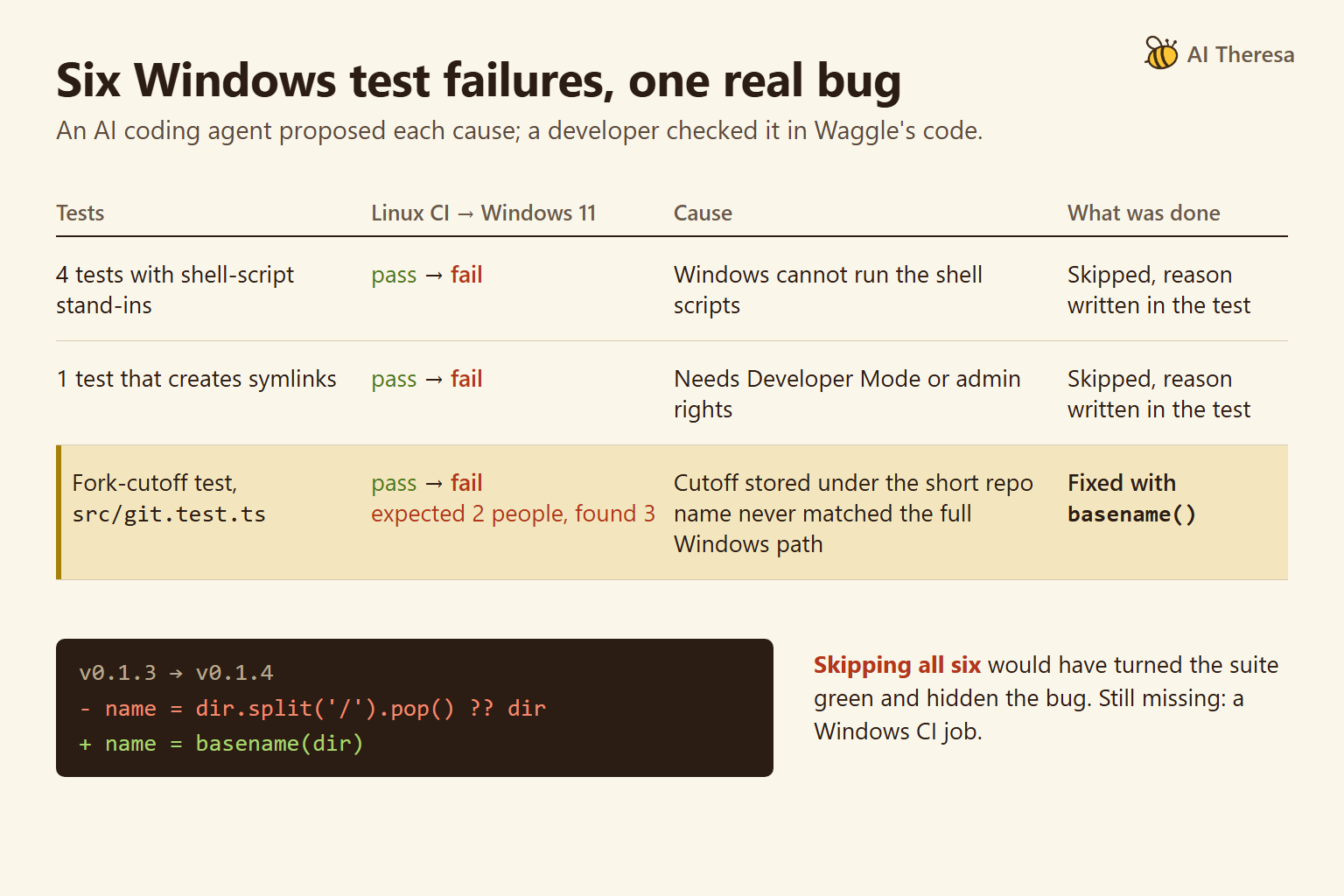
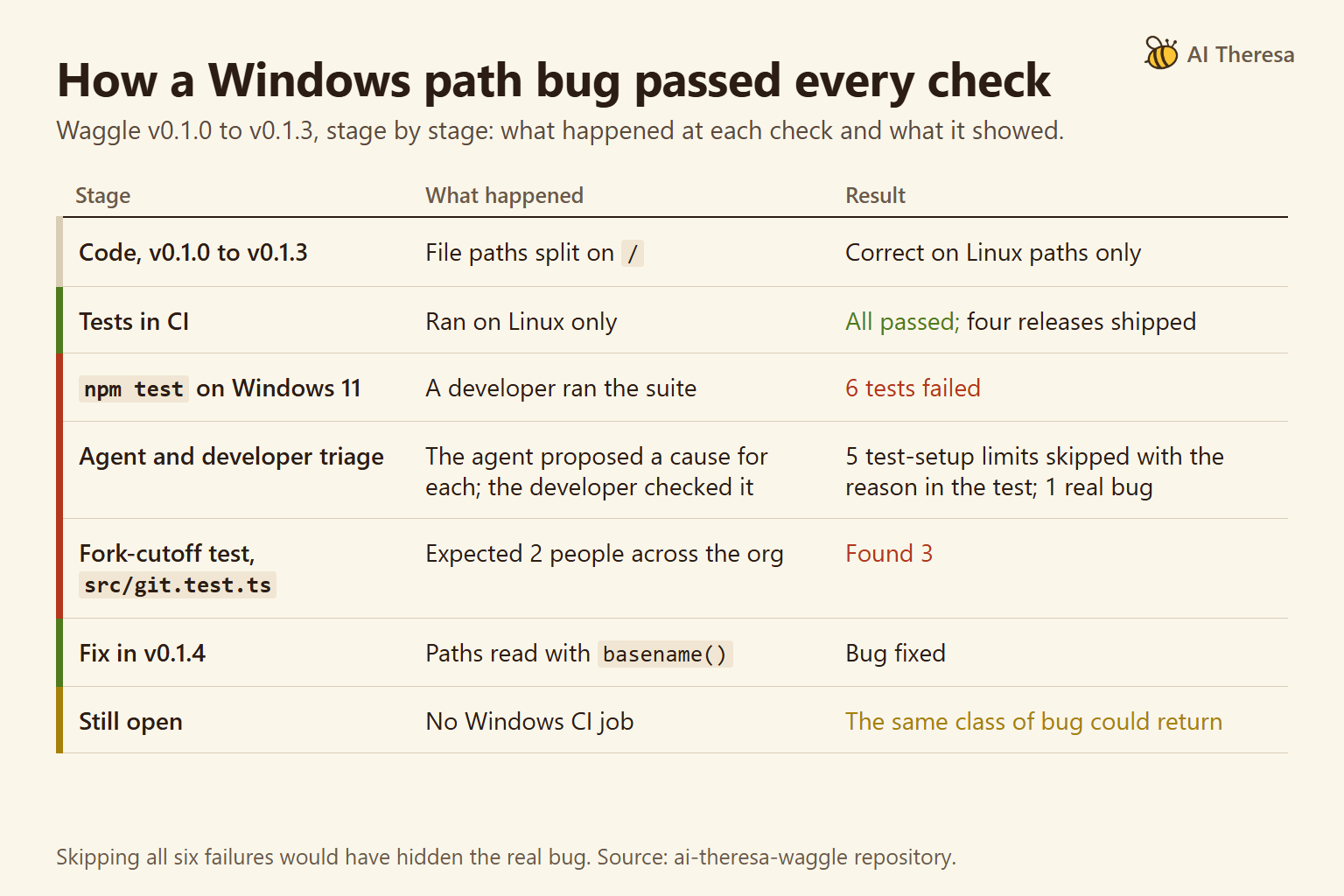
Our running example is a bug in Waggle, our open-source code auditor. Versions 0.1.0 to 0.1.3 split file paths on /, which breaks on Windows paths. CI ran on Linux only, so every test passed and four releases shipped with the bug. A developer found it by running npm test on Windows 11; a Waggle scan did not find it.
Our AI code debugging walkthrough covers how the failures were triaged. Here the question is which stage could have stopped the bug before release.
Get Started with Theresa for FREEHow Does AI Help Prevent Production Bugs?
Reading the change before merge
A review bot reads the diff, which is the set of lines a pull request changes, plus nearby code. Anthropic's Claude Code Review adds a verification step that checks each finding against the code before reporting it.
Vendors are frank about the limit. GitHub says Copilot "may not identify all of the problems that are present in code, especially where changes are large or complex."
Some companies score risk instead of reading line by line. Meta's internal Diff Risk Score uses a fine-tuned Llama model to predict whether a change will cause an incident. Meta reports it let engineers land over 10,000 changes during a 2024 partner event that a code freeze would otherwise have blocked, a throughput figure with no baseline for bugs prevented.
Generating and running checks
Test generators write tests that must pass before a change merges. A test generated to pass on today's code records today's behavior, so it guards against regressions, not a bug already there. Snyk applies a similar gate to its own output: it re-scans each AI-drafted fix and regenerates it if the scan fails.
Tests also catch only what runs where they run. Waggle's path bug passed four releases of tests because CI ran on Linux. After a developer saw six failures on Windows, an AI coding agent proposed a cause for each, and the developer checked them against the code.
The stage that would have stopped it is a test run on Windows before release. A review bot might have flagged a path split on /, but we did not run one on that change, so we cannot say.
Watching production
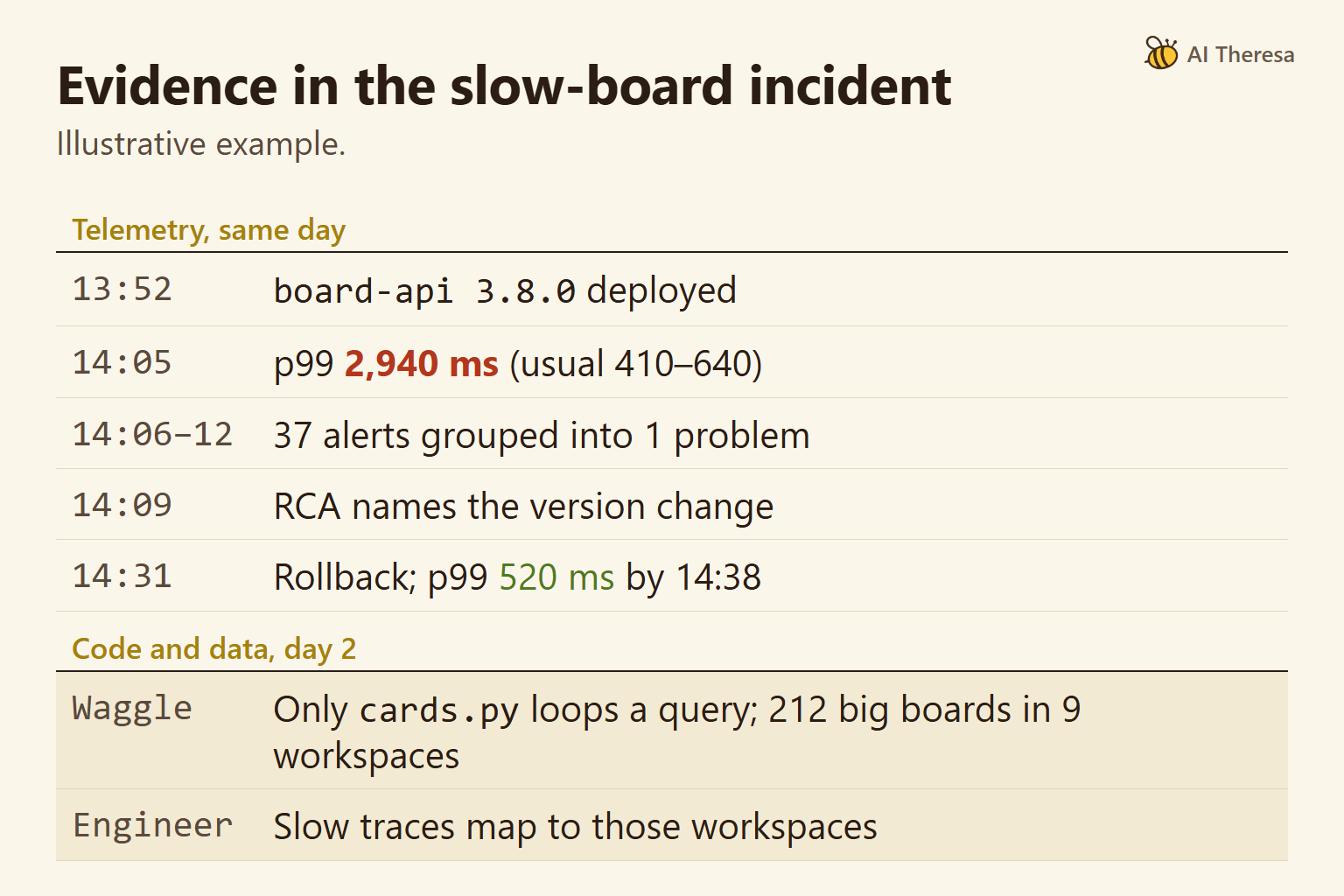
Monitoring tools read error events and telemetry, test a likely cause against them, and sometimes open a pull request with a fix. They shorten an incident rather than prevent it. Our production debugging guide covers what to do once one fires.
At Open Build Service, a schema migration defaulted a cache count to 0 while the code assumed every request had at least one action. The code went out before the data migration that recalculates the counts had run, and some users saw about an hour of server errors. The team's lesson is that code depending on a data migration needs careful deployment planning. In our reading, a staging deploy on migrated data would also have shown the gap.
Get Started with Theresa for FREEBest AI Tools for Reducing Production Bugs
We group the tools by stage: audit and pull request review first, then scanners and test generators in CI. Production monitoring comes last; it acts after users see the bug but catches what nothing earlier can.
Within a group, we rank by what a tool reads beyond the diff, the evidence it gives per finding, whether its result can block a merge, its platforms, and price clarity. Waggle is listed first because it reads business data such as warehouse tables next to the code and reports what it ruled out; it does not block a merge itself. Among review tools, those that can fail a merge check come before comment-only ones.
A disclosure: we make Waggle and rank it first. We did not test these tools head to head. Every fact and price below comes from each vendor's docs and pricing pages as of November 2026.
1. AI Theresa: Waggle and Enterprise
Waggle is an open-source, read-only auditor of code and, optionally, connected data such as BigQuery. It can also read SQL, Redis or any other source through a read-only MCP server. MCP, the Model Context Protocol, is a standard way to connect AI tools to outside systems.
Each finding comes with evidence, a fix, a "done when" condition and a "how to verify" check. Unsupported claims become open questions, and clean checks are reported as ruled out.
A Full Scan covers security, architecture, release engineering, business logic and more. It typically costs $5 to $30 on your own Anthropic key and takes 20 to 60 minutes. A Quick Ask answers one question with cited evidence for about $0.30 to $1. Reruns, by hand or from CI, flag what is new, fixed or still open.
Enterprise adds an interactive report, editable org memory and deployment in your cloud, for a fixed annual fee with a 14-day free trial. Its strength is reading code and data together. With a read-only data connection, a Quick Ask can check whether any row breaks an assumption in the code. Run against staging after a schema migration, that is the kind of question behind the Open Build Service bug. We have not run Waggle on that case.
The limits are real. It is not a pull request bot, does not run code, and has no runtime view, tracing or alert ingestion.
There is no public accuracy benchmark yet. Its claim audit is a model checking a model, a filter rather than a test, and the cost cap is not hard. The Windows bug in this article was found by a developer running tests, not by a Waggle scan.
2. CodeRabbit
CodeRabbit reviews pull requests on GitHub, GitLab, Azure DevOps and Bitbucket, and its CLI reviews changes before you commit. CodeRabbit's plans start at Essentials for $24 per developer per month billed annually ($30 monthly), then Team at $48 and Advanced at $72.
The free tier covers pull request summaries, with code reviews available in the VS Code extension and CLI; open-source projects get Team features free.
Its pre-merge checks can block a merge in error mode with Automatic Approvals turned on; the default warning mode only comments. Its strength is broad platform support plus a pre-commit check. Its limit is that it reads the change and the repository, not production data. The tiers were renamed in 2026, so older price comparisons are out of date.
3. Cursor Bugbot
Bugbot reviews pull requests for bugs, security issues and code quality on GitHub, GitLab, Bitbucket and Azure DevOps. It reports a check status of success, neutral or failure, and, where Cursor makes it available for your organization, you can set it to fail on unresolved findings. It starts on Cursor's Premium plan at $30 a month, or $30 and up per user on Teams. Cursor also agreed to buy Graphite, another review tool, in December 2025.
Its strength is that it can act as a gate where that option is on. The catch is in Cursor's docs: "Requiring the status alone does not block merges on findings because findings default to neutral." It also skips pull requests larger than its review-size limit.
4. Claude Code Review
Claude Code Review runs several agents over the diff and surrounding code, verifies each finding, and ranks findings by severity. Its default focus is "bugs that would break production, not formatting preferences or missing test coverage." It runs on Team and Enterprise plans, billed on token usage with a monthly spend limit and no flat per-review price.
The /code-review command works in a Claude Code session on any plan, from Pro at $17 a month billed annually.
Its strength is the verification step before anything is reported. Its limits, per Anthropic: it works only with GitHub, is unavailable with Zero Data Retention or customer-managed keys, "never approves or blocks the pull request," and "may miss bugs." Waggle also installs as a Claude Code plugin, so the two can run side by side.
5. GitHub Copilot code review
Copilot code review comments on pull requests using your project's context, and cross-repository context is in public preview. GitHub's plans page lists review from Copilot Pro at $10 per user per month, with Pro+ at $39 and Max at $100, billed in GitHub AI Credits. The Free plan has no pull request review.
Its strength is that it lives where most teams already open pull requests. Its limits are that it works only on GitHub and, in GitHub's words, you should use it "to supplement human reviews, not to replace them."
6. Qodo
Qodo offers agentic pull request review with a rules system, cross-repository review and a map of code across repositories. Its workflows can auto-approve a pull request that meets your conditions, though we found no option to fail a check on findings. Qodo's pricing page lists Pro Team at $30 with monthly billing, pooled credits at $0.015 each, a 14-day trial and a free program for open source.
Its strength is rules plus context from other repositories. Its limits: "We don't offer a permanent free tier," and credit metering makes the cost of a review vary with the size of the pull request.
7. Snyk Code and Snyk Agent Fix
Snyk Code scans for security flaws in the IDE and in CI. Snyk Agent Fix, formerly DeepCode AI Fix, drafts a fix, re-scans it, and regenerates it if the scan fails. The Free plan includes 100 Snyk Code tests a month, and Team starts at $25 a month.
Its strength is that the scanner that found the flaw also checks each fix. Its limit is scope: it targets security bugs, not business logic, and it "focuses on single-file fixes." A developer still reviews each fix before merge.
8. Diffblue
Diffblue generates unit tests for Java and Python, and its pricing page says "Every test compiles, passes, and improves coverage." You pay for net new coverage, starting at $1,500 for 5,000 lines, or $0.30 a line.
Its strength is that its tests become a check your CI can block on. Its limits are two languages, and its tests run only where your CI runs, which for Waggle was Linux.
9. Sentry Seer
Seer is Sentry's AI debugging agent. It finds the root cause of a captured error and can open a pull request with a fix through Autofix. Sentry's pricing docs list $40 per active contributor per month until December 8, 2026, when Seer moves to usage-based credits. Seer Code Review, its pre-merge reviewer, will be removed on the same date.
Its strength is real-time error monitoring tied to your repository. Its limit is timing: it acts after an error is captured, which is after users hit it. It supports only the cloud versions of GitHub and GitLab.
10. Datadog Bits AI
Datadog's Bits AI, made up of Bits Investigation and Bits Code, uses Datadog observability data to diagnose and fix issues in your code. It opens a pull request it "never auto-merges." Datadog's pricing page lists $500 per 500 credits a month billed annually, or $1.30 a credit on demand, on top of other Datadog products. An investigation takes about 4 credits and a fix about 5.
Its strength is deep telemetry when you already run Datadog. Its limits, per Datadog: it "does not support multi-repository investigations" and "can make mistakes," and it needs Datadog data to work.
| Tool | Where it stops a bug | Pros | Cons | Starting price |
|---|---|---|---|---|
| Waggle and Enterprise | Audit of code and data, before or after release | Reads code and data; shows what it ruled out | No runtime view; no public benchmark | Open source; scans $5 to $30 |
| CodeRabbit | Pull request review | Four platforms; can block in error mode | No production data | $24 per developer |
| Cursor Bugbot | Pull request review | Can fail the check where enabled | Findings neutral by default | $30 a month |
| Claude Code Review | Pull request review | Verifies findings | Never blocks; GitHub only | Token usage |
| Copilot code review | Pull request review | Built into GitHub | GitHub only; may miss issues in large changes | $10 per user |
| Qodo | Pull request review | Rules and cross-repo context | No free tier; credit metering | $30, Pro Team |
| Snyk Code and Agent Fix | IDE and CI security scan | Re-scans each fix | Security only; single file | Free; Team $25 |
| Diffblue | Test generation | Tests compile and pass | Java and Python only; records current behavior | $1,500 |
| Sentry Seer | Production errors | Root cause and fix PR | After users hit the bug | $40 per contributor until Dec 8, 2026; then usage credits |
| Datadog Bits AI | Production telemetry | Deep telemetry | Needs Datadog; one repository | $500 for 500 credits |
We left off Greptile and Graphite Agent, both pull request reviewers, plus Lightrun and rule-based scanners such as SonarQube and Semgrep. Our guide to AI-driven debugging solutions compares tools for after a bug is found.
Get Started with Theresa for FREEHow to Choose the Right AI Tool for Reducing Production Bugs
Start from where your recent incidents began, then add the tool that covers that stage.
| Where do your escaped bugs start? | What to add first | What it cannot see |
|---|---|---|
| Logic slips inside a diff | A review bot such as CodeRabbit, Bugbot, Claude Code Review, Copilot or Qodo | Production data and other environments |
| Regressions in code with thin tests | Test generation such as Diffblue | Bugs already present in current behavior |
| Security flaws | Snyk Code with Agent Fix | Business logic and multi-file fixes |
| Failures only under production traffic | Sentry Seer or Datadog Bits AI | Anything before users hit it |
| Data or environment mismatches | A code and data audit such as Waggle, plus tests in each target environment | Runtime behavior, since Waggle does not run code |
For bugs that start in data, the check has to read the data. Theresa's forward-deployed engineering team, offered on the Enterprise plan, traced untrustworthy dashboards to upstream schema drift for one client before rebuilding them.
Make one check block the merge
A finding prevents nothing if the merge goes ahead anyway. On GitHub, branch protection lets you require a status check to pass before merge. With Bugbot or CodeRabbit you also have to switch findings from neutral or warning to failure. Tuist's postmortem names the same gap: "The main branch does not require continuous integration to pass."
Test in every environment you ship to
Run the suite on each operating system and runtime your users have. Waggle's path bug shipped in four releases because CI ran on Linux only. When the suite first failed on Windows, skipping all six failures would have hidden the real bug. Five were test-setup limits, so the developer skipped them with the reason written in each test.
We still lack a Windows CI job, so the same class of bug could return. We name that gap because the advice above applies to us too.
Measure escaped bugs, not comments
Count the bugs that reach production and DORA's change failure rate, the share of deploys that cause a failure. For each incident, record the stage that should have caught it, as the table above does. Keep a tool if incidents at its stage fall over two quarters. Our Windows bug would go under "environment coverage".
Get Started with Theresa for FREEConclusion
AI tools for reducing production bugs work at different stages: review before merge, tests in CI, security scans, production monitoring, and audits of code with its data. Each one sees only what reaches its stage, and a finding stops a bug only when a rule acts on it.
Start with the stage where your last few incidents began, and make that check block a release. Then add the next stage, test in every environment you ship to, and judge each tool by the bugs that still escape.